Summary in 3 lines
- AutoClip is an MIT open-source tool that reads the captions of a long video, picks the highlights, and cuts them into short-form clips and compilation videos.
- You can switch the model in settings, from Qwen, OpenAI, and Gemini to local models like Ollama, and with a local model there are no cloud API fees.
- Since v1.3.2 you can post or schedule to 12 social platforms directly, and you start with the desktop app or a single docker compose line.
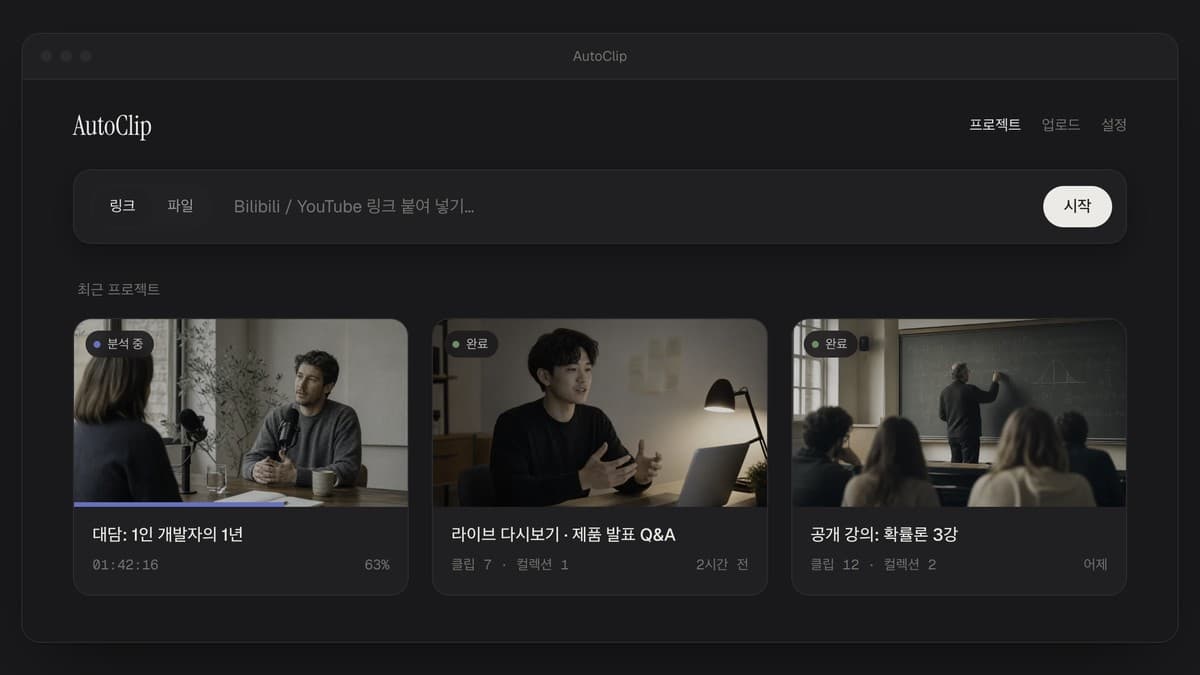
If you are tired of uploading your source video to a subscription editor and picking clips every time you turn a long video into shorts, AutoClip is worth a look. Load a local file or a YouTube or Bilibili video, and it finds highlights from the captions and exports short clips and compilation videos. It is free open source under the MIT license on GitHub, with 8,974 stars and 1,651 forks as of September 27, 2026. It gained 1,541 stars this week alone and reached #3 overall on GitHub Trending on September 21. A solo developer in China, zhouxiaoka, maintains it in spare time, and the app and README support 8 languages, including Korean.
On September 23 at 3:25 AM (Korea time), GitTrend.io introduced its caption analysis, highlight scoring, and local, YouTube, and Bilibili inputs.
Source: X @gittrend_io
1. Find highlights in captions and turn them into clips
The workflow runs in this order: import the video, prepare captions, AI analysis, clip editing, and export. If you have an SRT file, you add it, and if not, local faster-whisper turns the audio into text. The LLM reads the captions to outline the video and a topic-by-topic timeline, scores candidate segments for highlights, and writes clip titles. The default score threshold is 0.7. If you get too few results, you can lower it to 0.5 to cast a wider net.
FFmpeg cuts the chosen segments into clips, and it also generates recommended compilations that bundle several clips. You can adjust the order of a compilation video yourself. Because it analyzes mainly the caption content, it fits videos where speech matters most, such as interviews, podcasts, lectures, and live stream replays.
2. Feed it a local video or a link as is
Inputs are local MP4, MOV, and MKV videos, YouTube and Bilibili links, and optional SRT captions. If there are no captions, set up Whisper under the transcription menu in the desktop app settings. On the first transcription it downloads a speech recognition model, then turns the video's audio into captions.
3. Switch models with one setting
For cloud providers you can choose Qwen, OpenAI, Gemini, DeepSeek, Doubao Seed, Kimi, GLM, and Grok. For OpenAI-compatible APIs, you connect by entering the provider's Base URL and model details. For local models, it supports Ollama and LM Studio.
| Method | Example setting | Cost and requirements |
|---|---|---|
| Ollama | http://localhost:11434/v1, qwen2.5:7b | No API key needed; you need a PC to run the model |
| LM Studio | http://localhost:1234/v1 | Runs the model locally |
| Cloud API | Set the provider, Base URL, and model | Your own API key and the provider's fees apply |
With a local model, cloud inference API fees are $0, and you use your PC's memory and compute instead. Video cutting and rendering run on your own computer. If you choose a cloud model, the caption text needed for analysis is sent to that company.
4. Post or export by platform
Since v1.3.2, you can connect an Upload-Post account to post or schedule directly to 12 platforms, including TikTok, Instagram, YouTube, Facebook, LinkedIn, X, Pinterest, Bluesky, Discord, Telegram, and Google Business. Upload-Post also has a free tier. Bilibili uses a separate connection method where you paste your account login cookie in settings. You can also just export the files without posting.
When posting, you can use burned-in captions, a title card of about 4 seconds, and automatic cover options, and the default post status is private. Output presets are available for Douyin, Xiaohongshu, YouTube Shorts, and Bilibili.
5. Install it and make your first clip
① Desktop app
Download the .dmg for macOS Apple Silicon or the -setup.exe for Windows 10 and 11 from GitHub Releases. Python and FFmpeg are bundled in the app, so you do not need to install them separately. After installing, pick the LLM provider and model in settings, run the connection test, and then import a video. The first time you open it on macOS, right-click the app and choose "Open," and if Windows SmartScreen appears, click "More info" → "Run." For videos with no captions, set up Whisper under the transcription menu in settings. It downloads a speech recognition model on the first transcription.
② Docker web app
To run it as a server, create the config file and then one docker compose up line is enough. Get Docker and Compose v2 ready, then run the commands below from the repo. In .env, set the LLM provider and model, and an API key if needed.
git clone https://github.com/zhouxiaoka/autoclip.git
cd autoclip
cp env.example .env
# Set LLM_PROVIDER, model name, and API key in .env
mkdir -p data logs uploads
docker compose up -d --build
# Open http://localhost:3000 in your browser
③ CLI
You need Python 3.10 or later (3.11 recommended) and FFmpeg on your PATH. Here is an Ollama example.
git clone https://github.com/zhouxiaoka/autoclip.git
cd autoclip
python3 -m venv venv
source venv/bin/activate
python -m pip install -r requirements.txt
python -m pip install -e .
ollama pull qwen2.5:7b
python -m pip install faster-whisper
autoclip doctor --provider ollama
autoclip run talk.mp4 --provider ollama --json
# If you have SRT captions: autoclip run talk.mp4 --provider ollama --srt talk.srt --json
# Check the project ID, then export
autoclip export PROJECT_ID --preset shorts
Running the CLI locally does not need Redis. You can also connect AutoClip as a tool from an MCP client.
④ MCP clients such as Claude Code
Put the absolute path of the autoclip executable installed in your virtual environment into your config and run the MCP server.
{"mcpServers":{"autoclip":{"command":"/absolute/path/to/autoclip/venv/bin/autoclip","args":["mcp"]}}}You can use tools such as clip_video, start_clip_job, get_job_status, and export_clip. For per-client setup details, see the CLI and MCP guide.
6. AutoClip vs. OpusClip
| Item | AutoClip | OpusClip |
|---|---|---|
| Price | App is free (MIT). Use your own API key or a local model | Free $0/month, 60 credits; Starter $15/month, 150 credits; Pro $29/month, 300 credits ($14.50/month equivalent billed yearly, $174 per year) |
| Models | Choose a cloud provider or Ollama or LM Studio yourself | AI features included in the service |
| Video processing | Clips generated and rendered on your computer | Edited through a web service flow |
| Posting | Connect Upload-Post or a Bilibili account; file export also works | Export and posting features depend on the plan |
| Editing and collaboration | Focused on clip editing and reordering | Editing and team features on paid plans |
OpusClip Free gives 60 credits a month, but it adds a watermark, limits editing, and after 3 days you can no longer export. Starter is $15 billed monthly, and Pro is $29 billed monthly or $174 annually. If you want an editor plus B-roll and team features in one place, OpusClip is more convenient, and if you want to pick your own model and make clips on your own computer with no subscription fee, AutoClip fits.
On September 23 at 11:58 PM (Korea time), Alex Verem introduced AutoClip turning a 2-hour video into short clips locally.
Source: X @alex_verem
7. Recent updates
- v1.3.1 · September 22, 12:47 AM (Korea time): 8 language support
- v1.3.2 · September 23, 12:51 AM: Posting, scheduling, and automatic covers added
- v1.3.3 · September 23, 2:18 PM: Stability improvements
- v1.3.4 · September 24, 1:07 PM: Stability improvements
- v1.3.5 · September 26, 2:40 AM: Stability improvements
- v1.4.0 · September 27, 4:31 PM: Added analysis of game recording videos. It finds on-screen scenes with a multimodal model you set up yourself to create highlights and promo drafts, and you can also choose caption analysis alongside it.
If you cut long videos into shorts every week, download the AutoClip desktop app and try cutting one first with a local Ollama model.