The CEO of a Japanese AI startup fixed his home Wi-Fi with Claude Code.
Responsiveness got up to 112x faster.
This was a connection that a mover's technician had told him "this is the best speed you'll get, no matter what you do."
PPPoE Held It at 184 Mbps
This is a hands-on account that Masahiro Chaen, CEO of Japanese AI company Digirise, posted on X at 12:03 PM (KST) on August 18, 2026.
Digirise helps businesses adopt and train on AI, and Chaen also advises several companies, including GMO AI & Web3.
The line was contracted at 1 gigabit (Gbps) but was actually stuck at 184 Mbps.
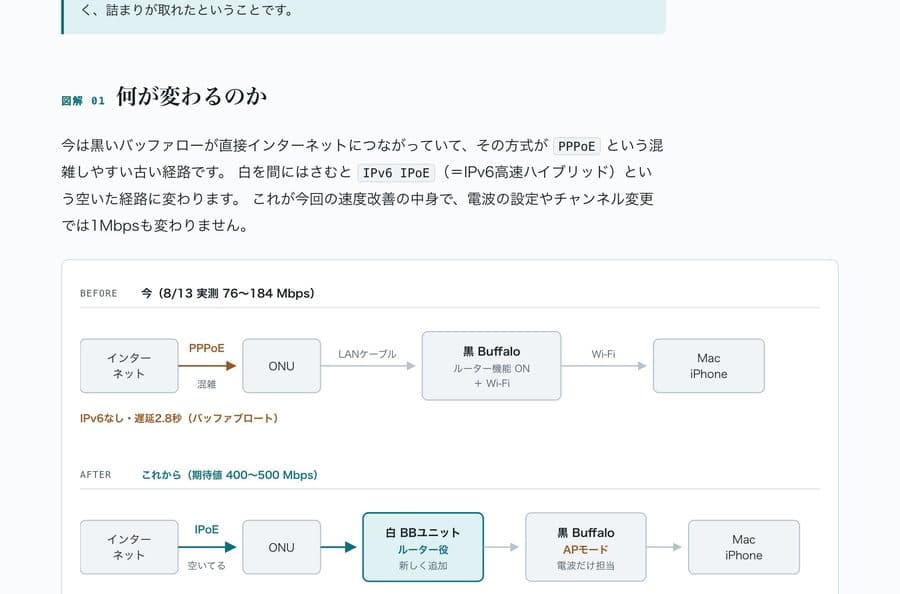
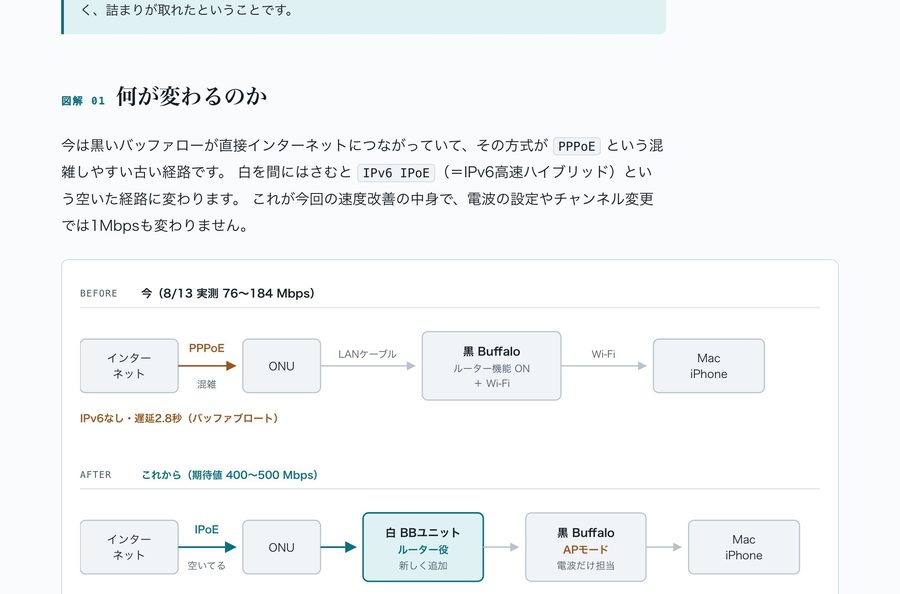
The cause was that he had used a SoftBank fiber line for over a year with the old PPPoE method.
What Claude Code Did
Chaen gave Claude Code five steps.
| Step | What happened |
|---|---|
| 1 | Wrote a diagnostic script that measures Wi-Fi signal, IPv6, routing, DNS, and bufferbloat in one go |
| 2 | Pinpointed the cause with traceroute: the Hikari BB unit was missing from the path |
| 3 | Ruled out ineffective fixes such as changing channels |
| 4 | Looked at a photo of the device and diagrammed how to connect the ports |
| 5 | Re-measured with the same script after the change |
The fix was to add a Hikari BB unit (513 yen a month) and switch to IPv6 IPoE.
The existing router had its routing function turned off and was left to broadcast the signal only (AP mode).
Measured Numbers
He compared before and after with the same diagnostic script.
| Metric | Before | After | Change |
|---|---|---|---|
| Responsiveness under load (RPM) | 11.0 | 1231.0 | about 112x |
| Download under load | 6.5 Mbps | 335.9 Mbps | about 52x |
| Idle latency | 36.5 ms | 10.1 ms | about 3.6x better |
| IPv6 | None | Yes | - |
Chaen explains that the real cause of the slowness wasn't the speed itself but bufferbloat.
When the line is congested, packets pile up in device buffers and latency grows.
It doesn't show up on a speed test, but in daily use it felt constantly clogged.
On a Mac, Start With networkQuality
If your own internet feels slow, the same approach is worth trying.
Chaen also published the diagnostic prompt in a follow-up post.
But the prompt assumes macOS's networkQuality command, so it can be used as is only on a Mac.
Original: post sharing the prompt
112x Is One Household's Measurement
This figure is a result Chaen measured on his own line, not material officially verified by SoftBank or a third party.
Results can vary with your line setup (whether you use PPPoE, how the Hikari BB unit works on a SoftBank fiber line).