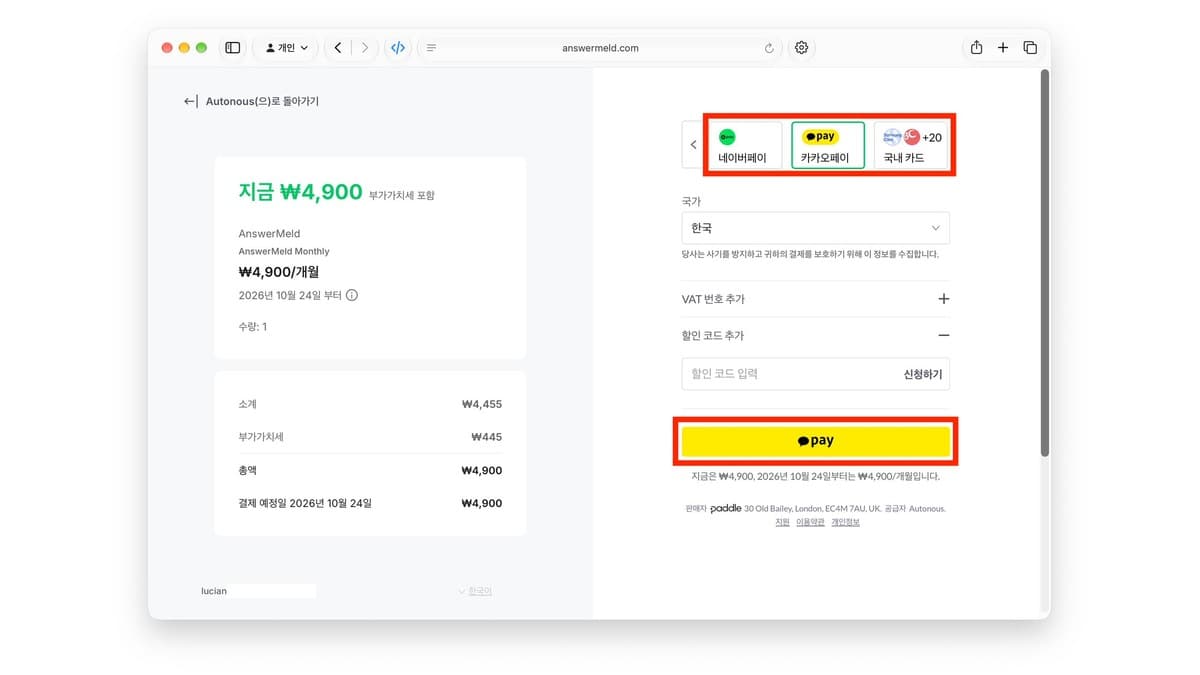
You built the app. Now how do you take payments? Do you need a foreign company to use Stripe? Can you accept Naver Pay, South Korea's largest portal's payment service? If you built your product fast with vibe coding, you hit these questions at the final payment step. Paddle lets an individual developer selling SaaS or digital products connect payments and tax handling in one flow.
Source: X @lucian__03. Indie developer Lucian shared the Paddle checkout screen and his experience adopting it.
Paddle is both the checkout and the seller
Paddle operates as a Merchant of Record (MoR). Paddle becomes the legal entity that sells to the buyer, processes the payment, and calculates, collects, files, and remits the VAT and sales tax that apply to each transaction. You build the product and subscription experience, and Paddle's service handles the payment infrastructure and country-by-country indirect tax.
Because of this structure, you can apply as an individual seller without making foreign company formation the first step of your payment integration. Paddle has no separate business verification step for individual and sole trader accounts. It sets up your seller account through a review of your product domain and identity verification.
Four reasons it suits individual developers
| Item | What Paddle offers |
|---|---|
| US company | Apply as an individual or sole trader seller |
| Business registration | Individual accounts proceed without a separate business verification step |
| Global sales | Cards and local payment methods for buyers in many countries |
| Transaction tax | As MoR, calculates, collects, files, and remits VAT and sales tax per transaction |
Korean customers pay with Naver Pay and Kakao Pay
For buyers in South Korea, you can offer 22 types of domestic cards plus Naver Pay, Kakao Pay, Samsung Pay, and PAYCO. Korean payment methods appear at checkout when the buyer's country is South Korea and the product price is in Korean won (KRW). In the Paddle dashboard, go to Checkout → Checkout settings and turn on the payment methods you want.
The Paddle changelog records Korean payment methods being added on May 16, 2025, an update that shows Naver Pay and Kakao Pay as separate options on November 18, and recurring subscription payment support for both on November 19. Customers can pick the method they know and continue into a monthly subscription.
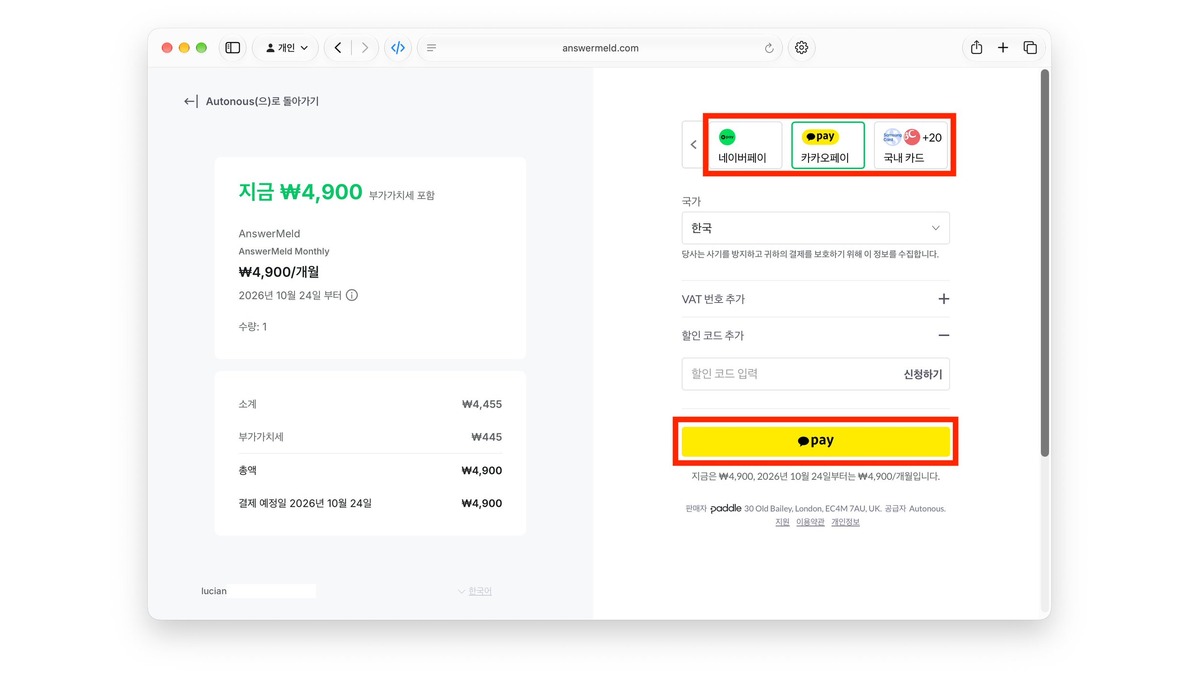
The AnswerMeld checkout screen in the original post shows a plan at KRW 4,900 per month (about $3.50). The screen breaks it out as a KRW 4,455 base price (about $3.18) and KRW 445 in VAT (about $0.32), and it also shows Naver Pay, Kakao Pay, and domestic card options, plus fields for a VAT number and a discount code. Paddle appears as the seller on the screen.
Fees are 5% plus 50 cents per transaction
Paddle Checkout's standard public pricing is 5% + $0.50 per transaction. There is no monthly fee or setup fee. Because Paddle is an MoR that includes payment processing and sales tax operations, you can weigh what is covered rather than comparing payment processor fees alone.
Payouts are monthly. On the 1st of each month, Paddle checks your account against the minimum payout threshold. If you are over it, the transfer is processed between the 2nd and the 15th, and it can take up to 3 business days to reach your bank after it is sent. The default minimum threshold is $100, and you can adjust it in your account. You can be paid by wire transfer or Payoneer, and you set the currencies and options available to your account under Transfer Preferences.
Source: X @lucian__03. The author shared his experience with ID checks such as a passport, face verification in some cases, and monthly payouts.
Sign-up goes through domain review, then identity verification
- Create a Paddle seller account and register the product you will sell and your website details.
- Run a domain review with a domain directly tied to your product. If your app is only accessible after login, provide a test account for the review.
- Individual sellers skip business verification and complete identity verification instead.
- After the account and domain reviews finish, start Live sales on the approved product domain.
Paddle focuses on selling SaaS, software, games, and digital products. Physical goods and services centered on human labor, like consulting, are excluded. When you register your product, set the product type and site description to match it so review and product setup go smoothly.
Seven steps to connect payments to your app
- Start in Sandbox: Build the payment flow in a development Sandbox account.
- Register products and prices: Create a Product and Price in the Catalog, and add a KRW price for Korean customers.
- Initialize Paddle.js: Put the public client-side token in your frontend and keep the secret API key on your server.
- Open the Overlay checkout: Call the following code from your payment button.
Paddle.Checkout.open({ items: [{ priceId, quantity: 1 }] }) - Test payments in Sandbox: Check the success, cancel, failure, and subscription renewal flows one by one.
- Connect webhooks: Create a notification destination, verify the signature, and sync app permissions from payment and subscription events.
- Go Live: Apply your approved domain, real prices, and Live credentials.
If you want to place the checkout inside a page, choose Inline Checkout. Start with the Overlay method for a fast first integration, and expand to Inline when you design the purchase experience into your screens. Official getting-started materials include a Next.js SaaS starter kit and Node, Python, Go, and PHP SDKs, along with Paddle MCP, a docs MCP, and guides for Cursor, Claude Code, and Codex.
Paddle and Stripe have different selling structures
| Category | Paddle | Stripe Payments |
|---|---|---|
| Seller of record | Paddle sells as MoR and handles transaction tax | Your business is the seller |
| Starting from South Korea | Offers an application process for individuals and sole traders | South Korea is not on the list of countries supported for a standard Stripe account |
| Tax | Calculates, collects, files, and remits indirect tax per transaction | Your business manages its tax obligations |
| Public base pricing | 5% + $0.50 | Fees vary by country, payment method, and product |
If you want to use Stripe, forming a US company through Stripe Atlas is one route. Atlas offers company formation options, and you can look at whether Stripe Payments accounts are supported and Managed Payments, the MoR product, as separate service terms.
From a working app to a service that takes payments
The faster vibe coding lets you build features, the more payments and subscriptions become the next step in turning a product into a real service. Paddle helps individual developers connect payment methods Korean customers know with global sales and tax handling in one flow, without starting from foreign company formation. Connect payments and webhooks in Sandbox first, then complete the product domain review and identity verification and move to Live.
Official resources and sources
- Paddle pricing
- Paddle account verification · Business verification · Domain review
- How Paddle handles tax · Payout method and schedule
- Korean payment methods · Korean checkout update · Wallet subscriptions
- Paddle Billing Quickstart · Overlay Checkout · Inline Checkout
- Stripe supported countries · Stripe Atlas
- Original post: X @lucian__03 · Paddle's official X account @PaddleHQ