Summary in 3 lines
- UpGuard found readable tables in 16,326 Supabase databases and saw personal data fields in more than half of them.
- Names, emails, phone numbers, and addresses were exposed most often, while passwords and PINs (8.2%) and authentication credentials (9.7%) appeared less often. Some cases also exposed plaintext passwords, OTP text messages, and private messages.
- For your own project, check RLS and policies for each table, warnings under Database → Security Advisor, and where you keep your service_role and secret keys.
Security firm UpGuard found readable tables in 16,326 databases run on Supabase. More than half of them had personal data fields, most often names, emails, phone numbers, and addresses, while passwords and PINs (8.2%) and authentication credentials (9.7%) appeared less often. Some cases also exposed plaintext passwords, OTP text messages, and private messages. The cause was less a breach of the database itself than misconfigured access permissions when apps were built and published.
Supabase is a development platform where web and app developers store and run their databases. TechCrunch reported on the research in the early hours of September 26 (2:29 AM Korea time) and pointed out that in the vibe coding trend of shipping AI-generated code quickly, security settings can get missed.
What was exposed across 16,000 databases
UpGuard collected about 300,000 domains showing signs of using Supabase, found database addresses in their public JavaScript, and queried a common table name, users. That yielded 16,326 databases with readable tables. Looking at table schemas, 55.8% had personal data fields, and in some cases actual data exposure was confirmed.
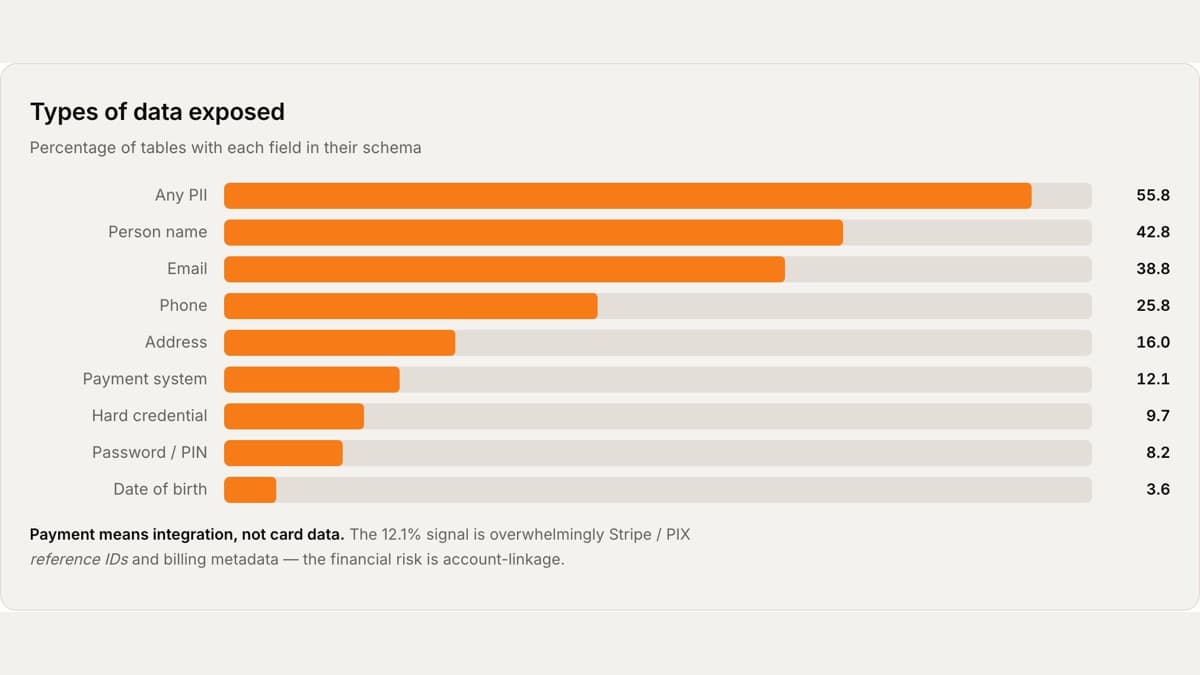
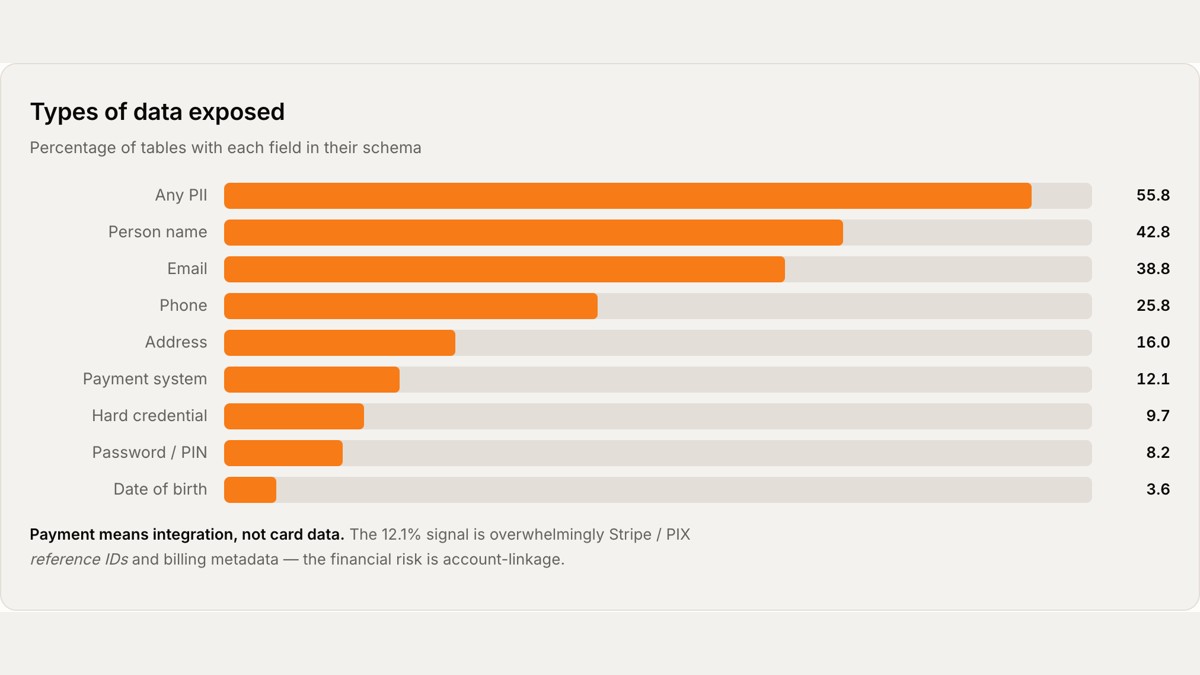
By table, name fields appeared in 42.8%, email in 38.8%, phone number in 25.8%, and address in 16.0%. Payment integration info was 12.1%, which means reference IDs from payment services like Stripe, not card numbers. Authentication credentials were 9.7%, passwords and PINs 8.2%, and date of birth 3.6%.
The chart is UpGuard's tally by data type from its report. Source: UpGuard.
By industry
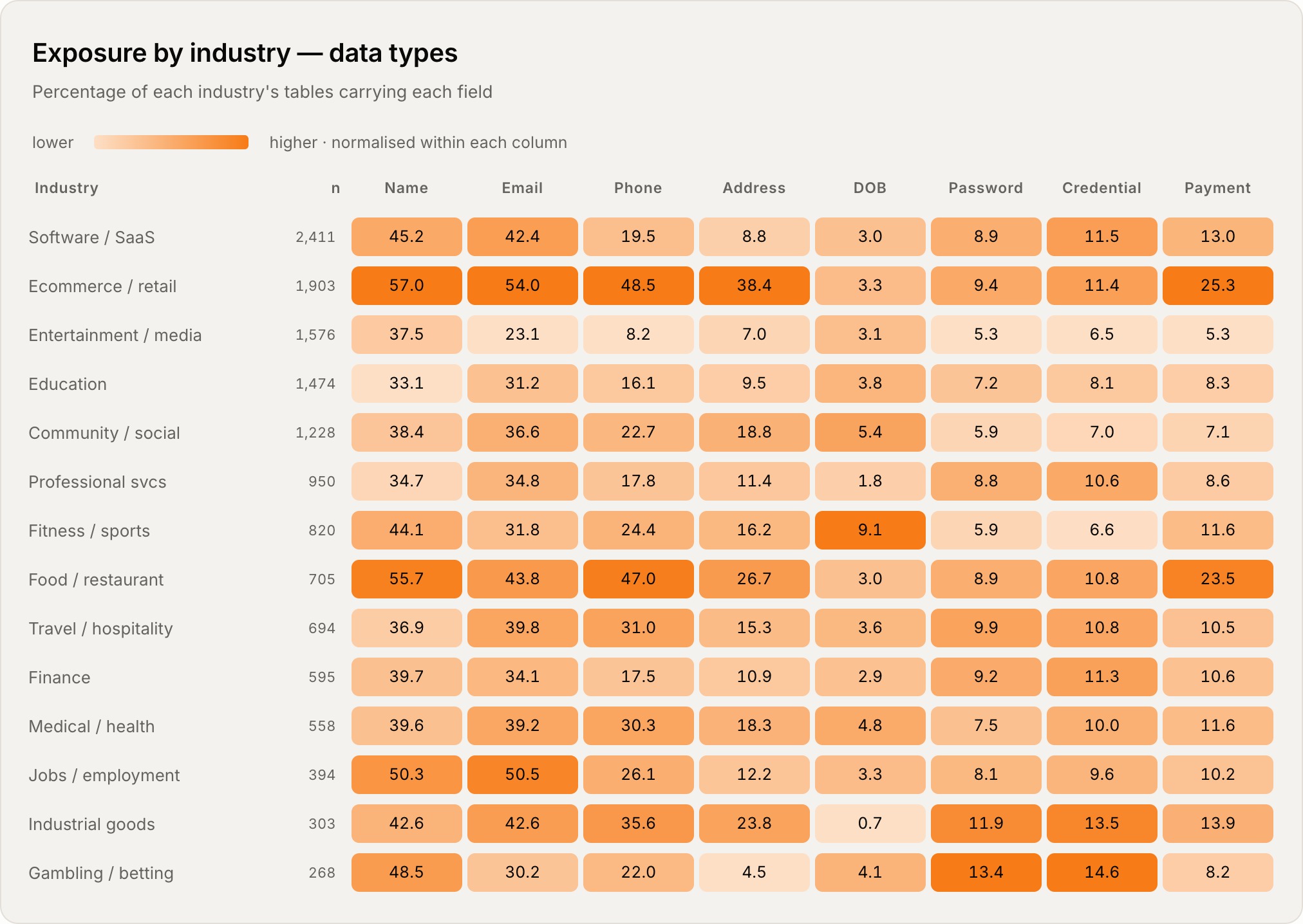
In shopping and retail, phone numbers appeared in 48.5% and addresses in 38.4%, and in restaurant databases phone numbers appeared in 47.0%. Gambling and industrial goods had relatively high shares of passwords, at 13.4% and 11.9%.
Cases where real data was exposed
- Thousands of vehicle license plates were exposed at a US valet service.
- Contact details of users of immigration and relocation services were exposed, and in a Canadian immigration service case, passwords were stored as plaintext.
- Information from an African country's consulate in France was also among the exposed cases.
- In the database of a Philippine virtual SIM service, OTP text messages were exposed and used to intercept SMS for scams.
- At an adult content service in India, user information and private messages were exposed.
Why RLS and access policies matter
Supabase databases use Row Level Security (RLS) to control which rows a user can read and change. If RLS is off, if a policy is open to everyone, or if the public key and secret key get mixed up, unintended data access becomes possible. RLS is on by default for tables created in the Table Editor, but you must turn it on yourself for tables created through SQL or the API.
The security challenge of vibe coding that this report points to is that while building apps fast with AI-generated code, developers may ship without checking these settings carefully.
Supabase's position
Supabase CISO Bil Harmer told TechCrunch that projects are built to be secure by default and that security is a shared responsibility between Supabase and its customers. The company's stance is that it provides secure defaults and tools, customers control their project configuration, and it notifies affected customers when a security issue is found. He added that it will keep improving so developers can ship safely.
Supabase grew alongside vibe coding
In June 2026, Supabase raised $500 million in a Series F at a $10 billion pre-money valuation. This was helped by the growing number of developers building and shipping apps with vibe coding. The wider the usage, the more important it becomes to check database permission settings.
3 steps to check your Supabase project
- Check RLS and policies on each table. Review your tables under Database → Tables in the Dashboard, and check policies under Database → Policies. For tables created through the SQL Editor or migrations, turn on RLS yourself.
alter table public.profiles enable row level security;Here is an example of policies that let a signed-in user read and update only their own profile. It assumes the user UUID is stored in
profiles.user_id.create policy "Users can read their own profile" on public.profiles for select to authenticated using ((select auth.uid()) = user_id); create policy "Users can update their own profile" on public.profiles for update to authenticated using ((select auth.uid()) = user_id) with check ((select auth.uid()) = user_id);Use a policy that allows everyone to read, such as
USING (true), only for data that is truly public. - Check Security Advisor warnings. In the Dashboard under Database → Security Advisor, look for warnings about disabled RLS, missing policies, overly broad policies, and exposed sensitive columns. Run it again after you fix them.
- Keep secret keys out of the client.
anonandpublishablekeys can be used in public clients, but data access must be restricted with RLS policies.service_roleandsecretkeys bypass RLS, so never put them in browser or app code or a public repo, and use them only on the server.
Official docs: Row Level Security, Securing your API, Database Advisors, API keys, Production Checklist.
If you have an app built on Supabase, open Security Advisor today. Start by turning on RLS for any table with a red warning.