You can now run a small model yourself that looks at a computer screen and clicks buttons or fills in forms. Cua-S1-4B-0.2, released by Cua on September 24, 2026 (Korea time), is a 4B computer-use model that takes a screen, a goal, and candidate actions and picks the next single action. It scored 92.9% on 168 fixed multimodal tasks from GUI-360, and the adapters plus training and evaluation code are public.
Source: X @trycua. The official announcement describes the model as "the first multimodal decision model trained with RLOO on live computer-use tasks, using task-completion rewards." That means it was trained with RLOO, using whether a task was completed on real computer-use tasks as the reward.
A small model picks one action at a time
The base of Cua-S1-4B-0.2 is Qwen/Qwen3.5-4B. A LoRA adapter on top of the full base model tunes it for operating a computer. The model card publishes two adapters. The text adapter reads the text and accessibility information of screen elements, and the multimodal adapter takes a screenshot as input.
The lines in the announcement video are "Small model. One decision at a time." and "Every step is one decision." Rather than generating a whole task plan as a block of text, it scores each action available on the current screen and picks the single best candidate.
It takes the screen, goal, and candidate actions, then decides the next step
The input is the current screen state, the goal the user wants to achieve, and a list of candidate actions prepared by the executor. A candidate can be expressed as a pairing of a screen element and an action.
(Edit "Email", fill): fill a value into the email field(Button "Submit", click): press the submit button(Checkbox "Agree", check): tick the agree checkbox(Dropdown "Country", select): pick an item from a list
Supported actions include fill, check, click, select, scroll, and skip. The executor carries out the action the model picked, reads the changed screen again, and passes it back to the model with the next candidate list. This loop handles multi-step tasks such as logging in, searching, filling out a form, and submitting it.
Two-stage training that uses task completion as the reward
The first stage is supervised fine-tuning (SFT). The model learns from pairs of screen states, candidate actions, and the correct choice so it gets used to the action-selection format.
The second stage is RLOO reinforcement learning in a real Cua GUI environment. The model attempts the same task several times and receives a reward based on whether it completed the goal. It compares the rewards of multiple attempts on one task and reinforces the choices with better outcomes. The training code is public in the Cua repo at libs/cua-s1.
92.9% on the GUI-360 multimodal evaluation
GUI-360 is a computer-use dataset and benchmark centered on Windows office apps, collecting screens, goals, accessibility information, and action trajectories. The full data covers many tasks, and the Cua repo evaluated the model on a fixed multimodal test split of 168 of them. This comparison used screen images as input in place of the accessibility tree.
| Model | Accuracy on 168 tasks |
|---|---|
| Cua-S1-4B-0.2 (multimodal) | 92.9% |
| djev (zero-shot baseline) | 60.1% |
| semif (zero-shot baseline) | 24.4% |
djev is the name of the untrained zero-shot baseline model in the table. By task type in the benchmark, Cua-S1-4B-0.2 scored high accuracy on form input, login, search and filtering, and page turning.
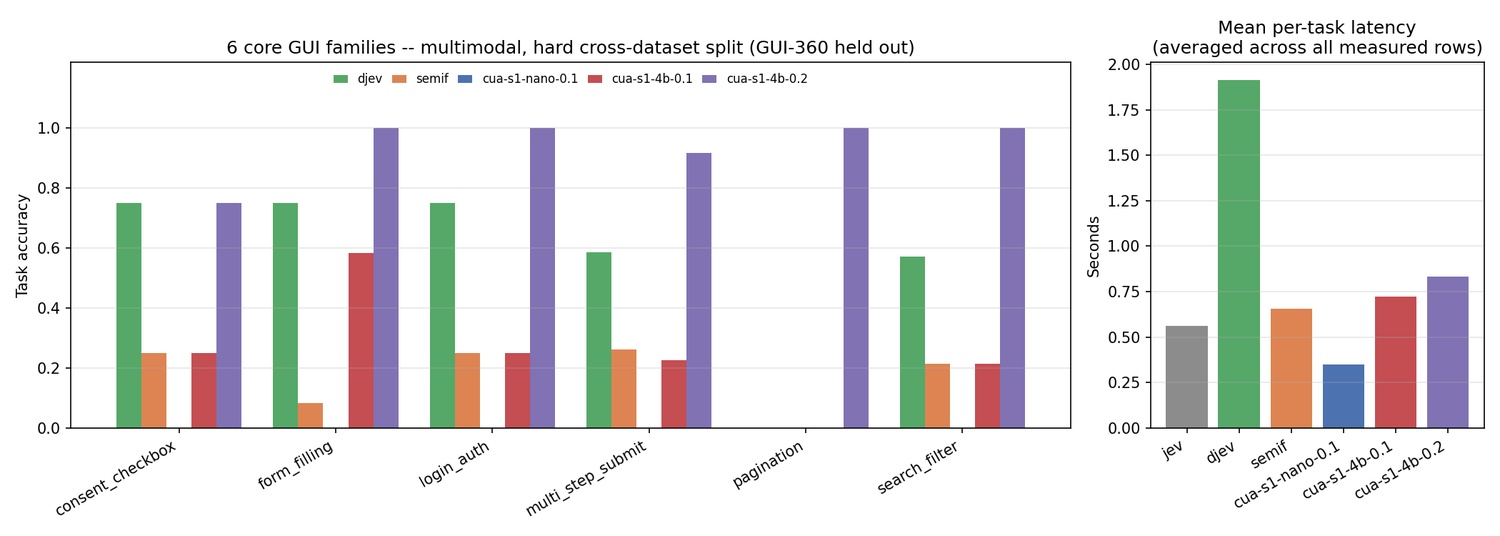
| Task type | Cua-S1-4B-0.2 | djev |
|---|---|---|
| Form input | 100% | 75% |
| Login | 100% | 75% |
| Search and filter | 100% | 57.1% |
| Multi-step submission | 91.7% | 58.6% |
| Agree checkbox | 75% | 75% |
| Page turning | 100% | 0% |
The 92.9% is accuracy on this fixed candidate-selection split. The GUI-360 paper describes the dataset and evaluation setup, and the Cua repo publishes the 168 multimodal tasks used and the score for each model.
See candidate scores in a browser demo
Cua released a browser demo on Hugging Face Spaces. Pick an example task and you can see the score for each screen element and action candidate.
The official account also posted a side-by-side demo showing step-by-step choices on recorded mobile and desktop tasks.
How to run the adapters and code yourself
The Cua-S1 text and multimodal LoRA adapters are released under Apache-2.0. In the Cua repo, the main component libs/cua-s1 holds the model and training code, and libs/cua-bench-s1 holds the evaluation tasks and results. The whole GitHub repo is MIT-licensed, and the Qwen license terms apply to the Qwen base model weights.
To install the FourB runtime dependencies for the repo's Python project:
uv sync --project libs/cua-s1/python --extra four-bThe model card's loading example looks like this.
from cua_s1.four_b import FourBModel

model = FourBModel(
    base_model="Qwen/Qwen3.5-4B",
    lora_adapter_path="cua-ai/cua-s1-4b-0.2",
    modality="text",  # or "multimodal"
)
Choose modality="text" for text screen state and modality="multimodal" for screenshot input. FourBModel computes the candidate action scores, and the Cua runtime environment connects the candidate list to the real computer-operation loop. The repo describes a FourB inference environment that uses Transformers 5 and torchvision.
Try one step of computer-use AI with a small model
Cua-S1-4B-0.2 releases a computer-use model at 4B scale that reads the screen and chooses one next action. You can look at the adapter that reads screen element text, the adapter that handles screenshots, the training code that rewards real task completion, and the GUI-360 evaluation code together. Where one giant model once made every decision, there is now an option to run a lightweight model that chooses at each step.
Sources
- Cua official launch announcement · September 24, 2026 (Korea time)
- Hugging Face model card
- Cua GitHub repo · cua-s1 model code · cua-bench-s1 evaluation
- GUI-360 paper · GUI-360 dataset
- Browser demo