
You are deep in a project in Cursor, then you move it to Codex. You open a new window and have to explain all of the earlier work from the beginning. Tencent says it wants to cut down on that hassle, and it has released Hy-Memory 2.0 as open source.
Do you still have to re-explain everything each time you switch AI tools?
Tencent Hunyuan has announced Hy-Memory 2.0, which lets several AI agents share memory. According to the official repository, when you move a project you were working on in Cursor over to Codex, you need to explain the earlier work less often.
There are three core parts. MemHub manages conversation content, work experience, and code change history in one place. A dedicated model, Hy-Memory-30B-A3B, selects and organizes what gets remembered. And all of it has been released as open source.
Shared memory does not mean handing over the whole record
When you hear shared memory, it is easy to picture every AI reading the same full conversation log. The official repository tells a slightly different story.
MemHub is introduced as a local-first desktop and CLI product. It gathers the conversation history and coding records from the AI apps you have authorized into one management runtime and one local data directory. The official description stresses local-first operation and unified management in a local data directory. Local-first, however, does not guarantee that nothing is ever sent externally.
One distinction is worth keeping in mind. MemHub, which connects the records, and the model, which decides what to keep as memory, play different roles. The focus of sharing is shifting from simple copying toward managing memory.
Conversation and code are remembered in different ways
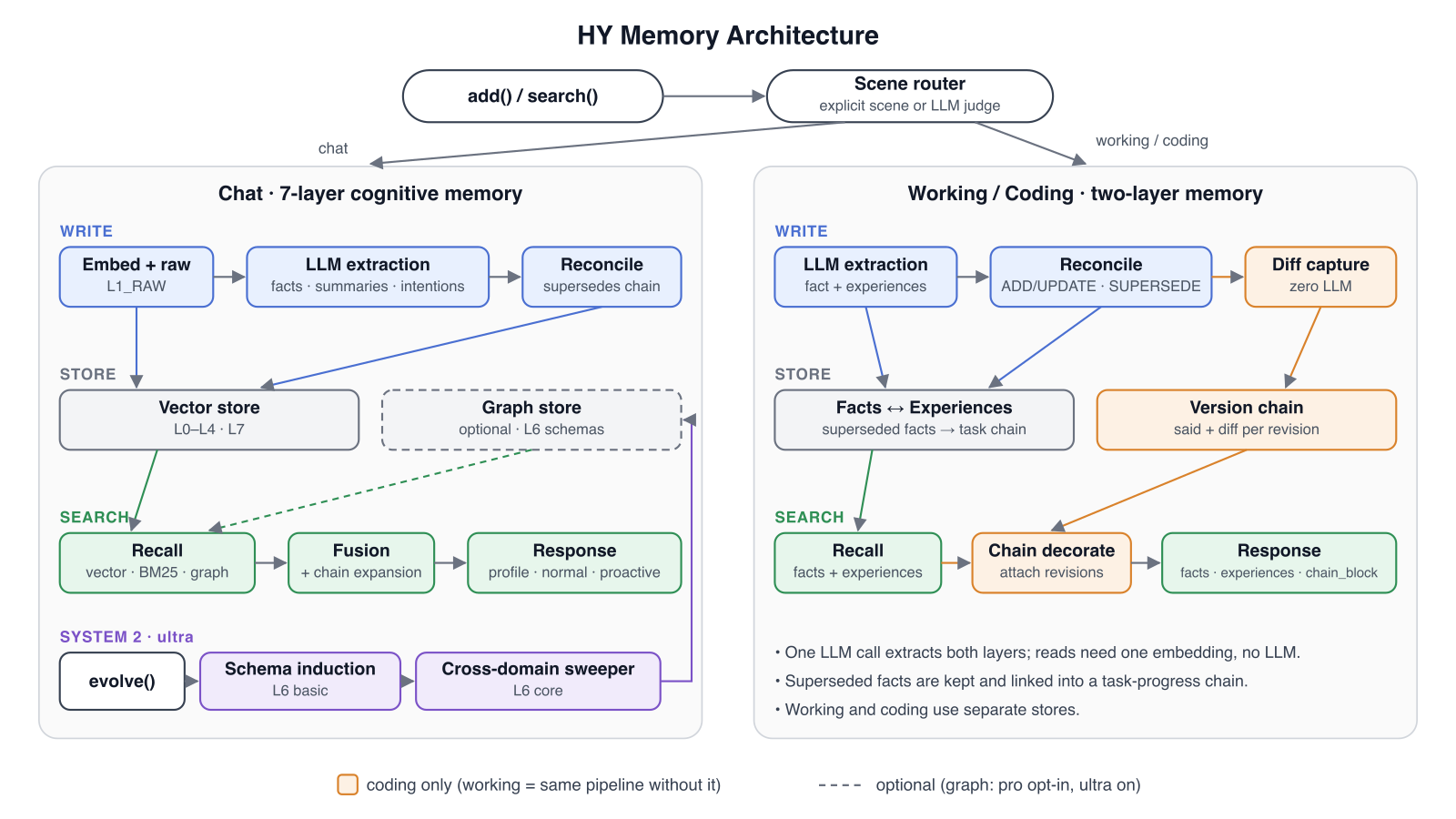
Hy Memory is offered as a memory engine and a Python SDK called hy-memory. The way it remembers changes with the nature of the work.
| Work scenario | Memory approach |
|---|---|
| Chat (conversation) | Layered long-term cognitive memory |
| Working (work) | Two-layer memory of facts and reusable experience |
| Coding (code) | Tracking that links differences across version changes |
The table shows that unified management does not treat every record in the same format. Conversation builds layers of context, work separates facts from experience, and code follows the flow of changes. The fact that Chat, Working, and Coding each handle memory differently is the part of this release worth watching.
If you move between several coding tools, start with the connection points
The official repository lists Claude Code, Cursor, Codex, OpenCode, and Qwen Code as example apps MemHub can connect to. Counting that list gives five. But these are examples, not the full number of supported apps.
If you are moving from Cursor to Codex, two points are worth checking. How the conversation history carries over, and how the context of code changes is kept. It also helps to remember that only apps you have approved get connected. Assuming that records spread automatically to every tool does not match reality. Before connecting, decide which apps, projects, and record ranges you will share.
The question is what you keep, not how much you pile up
In one line, this release is an attempt to combine moving context between tools with selecting what to remember. The official description separating conversation, work, and coding matters here. I think the value of shared memory lies less in collecting lots of records and more in remembering a different thing for each kind of work.
Hy-Memory 2.0 is Tencent's answer to reducing the burden of re-explaining when you move from Cursor to Codex. What to watch next is not how many records have piled up, but how naturally the work context carries over when you actually switch tools.
Source
- Tencent-Hunyuan Hy-Memory official repository: https://github.com/Tencent-Hunyuan/Hy-Memory