On September 23 (September 24 in Korea), Google applied Gemini Omni 1.1 Flash to Google Vids and opened AI video generation to more Google accounts for free. You can now go to vids.new on desktop, create scenes from a prompt, and edit them into a 1080p video.
It's getting harder to treat video production as the domain of professional tools and paid plans alone. The free tier has a monthly generation limit, but individuals and small teams who want to quickly turn an idea into video can try it right now.
What you can make for free in Google Vids
Google Vids is a browser-based video creation and editing tool. In this update, Google account users can also generate AI scenes with Gemini Omni 1.1 Flash. New scenes can be created in 1080p HD, and you can start from a template or a prompt and edit the flow of the video.
You can extend scenes and adjust each clip's length and transitions, and when you extend a scene it's designed to keep visual context such as a person's look and the lighting. You can also combine text, images, existing video, and narration on the timeline to add captions and voiceovers.
You can save the finished piece to Google Drive, download it as an MP4, or export it to YouTube. Clips made with Omni 1.1 have an invisible SynthID embedded in the video frames.
Monthly generation limits by account at a glance
On a personal Google account, you can generate up to 6 AI video clips per month, counted together with AI avatar generations. Paid plans have higher limits depending on the account type and plan.
| Account / plan | Monthly AI video clip limit | Note |
|---|---|---|
| Personal Google account | 6 | Counted together with AI avatars |
| Google AI Pro | 50 | Monthly limit |
| Google AI Ultra 5x | 250 | Monthly limit |
| Google AI Ultra 20x | 1,000 | Monthly limit |
Personal account limits reset at the start of the month (midnight US Pacific Time) and don't roll over. For Workspace work and school accounts, availability and limits can differ depending on the plan you've subscribed to and your admin's generative AI settings.
Starting at vids.new, including from South Korea
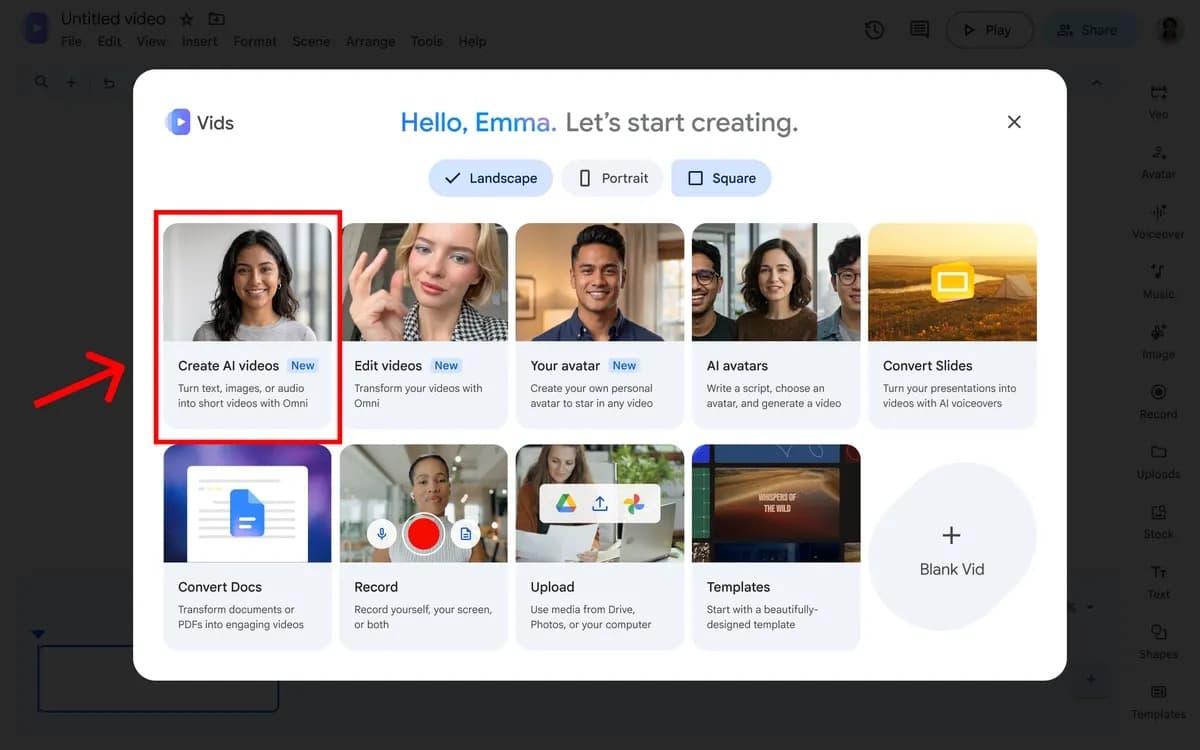
From South Korea too, you can use it by going to vids.new in a desktop browser. When you sign in with a personal account, choose Create AI videos on the start screen. For work or school accounts, an admin may need to allow Vids or AI features.
Korean AI voiceover is supported. However, Google's guidance explains that many of Vids's generative AI features are offered primarily in English, so it's more reliable to try your scene generation prompts in English first. Google has announced it will add voiceovers in more than 100 languages using Gemini 3.8 Flash-Lite TTS.
From vids.new to exporting an MP4
- Go to vids.new in a desktop browser and sign in with your Google account.
- Choose Create AI videos and pick a template or a blank project.
- Describe the people, setting, and mood of the scene in a prompt to generate it, then adjust clip length and scene transitions.
- Add the captions and voiceover you need and preview the whole timeline.
- Save with Share → Export to Drive, or download with File → Download → MP4. You can also export directly to YouTube.
Google also announced in April 2026 that Veo 3.1 video generation would be free in Vids. The core of this change is that Gemini Omni 1.1 Flash, 1080p output, and scene length and extension controls have been added to the free access range.
The race to offer free video generation is heating up
Free and low-cost access to AI tools isn't limited to video. ChatGPT Images is available on every plan and can create transparent-background images, and Adobe Firefly also gives free users a daily generation limit. The features and usage differ, but the race to open basic creation tools first and gather users continues across many fields.
With free 1080p AI video generation in Google Vids, paid video tools like Canva, Adobe, and Runway come under pressure on price and accessibility. The more options there are for making a video draft from just a template and a prompt, the more existing tools need to show strengths such as editing precision, collaboration, and brand management.
A free personal account can start with 6 AI clips a month. If you want to quickly test a short intro video or a product idea, you can make your first scene today at vids.new.