Summary in three lines
- Effort is a signal for how much computation and verification Claude puts into a task, and you can change it mid-conversation with
/effort. - Thariq uses a flow of spec interview → low implementation → review → high verification, and uses low far more often.
- For security, hardware, and bug fixes with many edge cases, a higher effort gets better results, but failures from the wrong approach are not fixed well by effort alone.
Thariq Shihipar of Anthropic's Claude Code team ran the same task several times at different effort levels and compared the results, the time taken, and the verification process. His conclusion is not to always use a high level. Use low when you are building together quickly, and high when the direction is set and you need careful verification.
Source: X @trq212 · Interactive explainer and experiment results
1. Effort tells Claude how much time you are giving it
Thariq compares effort to the time you give someone when you hand them a job. If someone asks you to take a full 12 hours, you read that as a request to dig into every corner. If they ask for the same job within an hour, you figure you should hand over a first version that meets the requirements and then fix things together. Some people say a job takes at least three hours and then use exactly three hours. Effort works the same way. At any level, Claude tries to do the job properly, but raising the level increases how much it judges and verifies on its own.
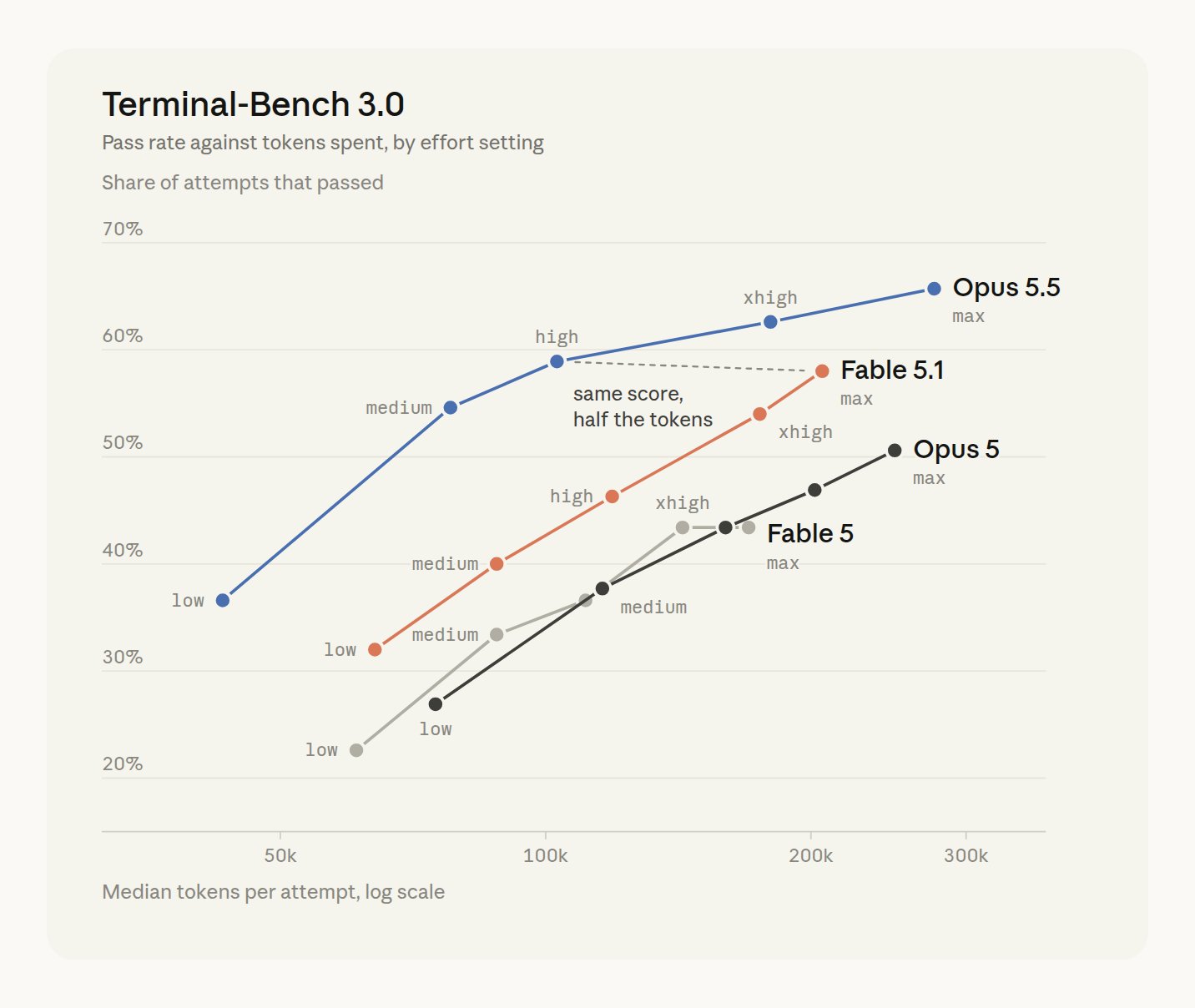
The effort curves Thariq compared for Fable 5.1 and Opus 5.5 were the best he has seen so far. As the level goes up, score and token usage rise together, and Opus 5.5 high scored about the same as Fable 5.1 max using roughly half the tokens.
2. Same workout app: 1.5 minutes at low vs 67 minutes at max
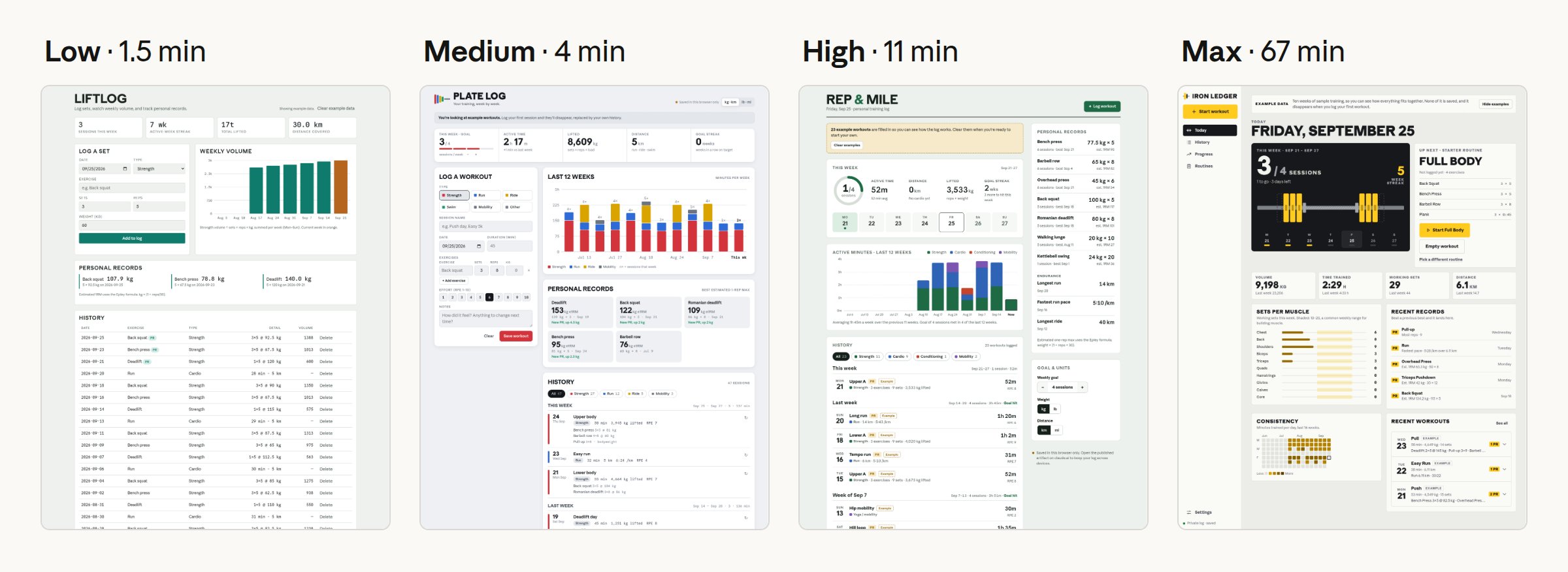
On a broad request like "build me a personal workout tracking app," low built workout logging and one chart in about a minute and a half. Medium took 4 minutes, high took 11 minutes, and max took 67 minutes and delivered an app with even a heatmap. Low suits a draft that a person will keep refining, while max suits a polished result in one pass.
3. A 1-minute sketch beats a 28-minute mockup
In a redesign of the Claude Code /config menu, the ideas for improving submenus and search were similar across levels. Low produced a sketch you could interact with in 1 minute, while max spent 28 minutes on a mockup that resembles Claude Code and an explanation of the usage flow. When the goal is quick feedback, the simple sketch was more useful.
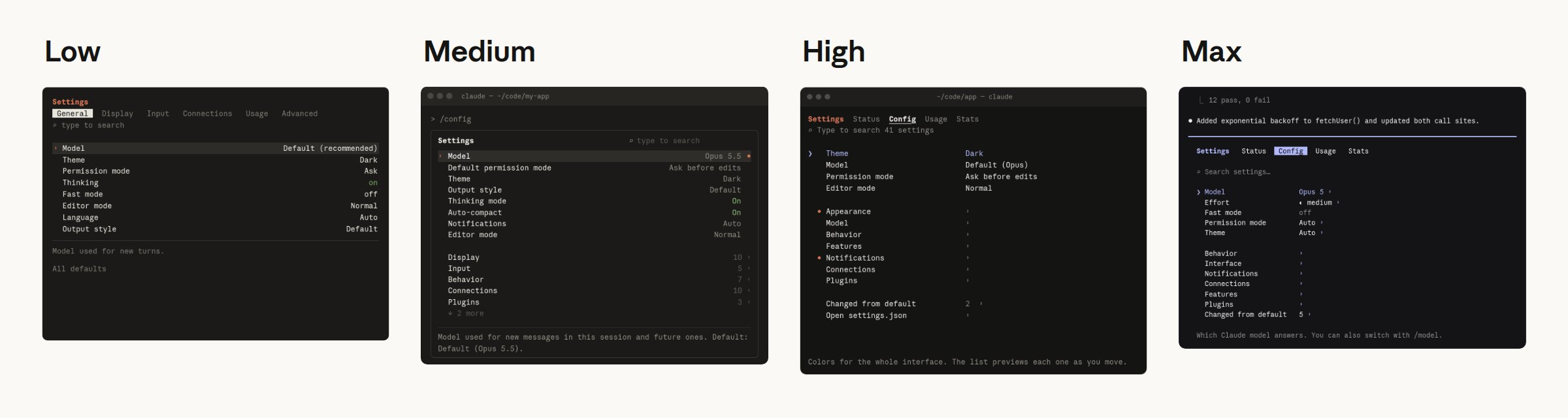
4. A detailed spec narrows the gap between levels
When Claude first asked questions to fill in missing requirements and the resulting detailed spec was passed to the same workout app task, the outputs looked more alike. Low took 16 minutes, medium 22, high 33, and max 79, with max spending its time polishing finer details. A big share of what high effort does is fill in the blanks a person left.
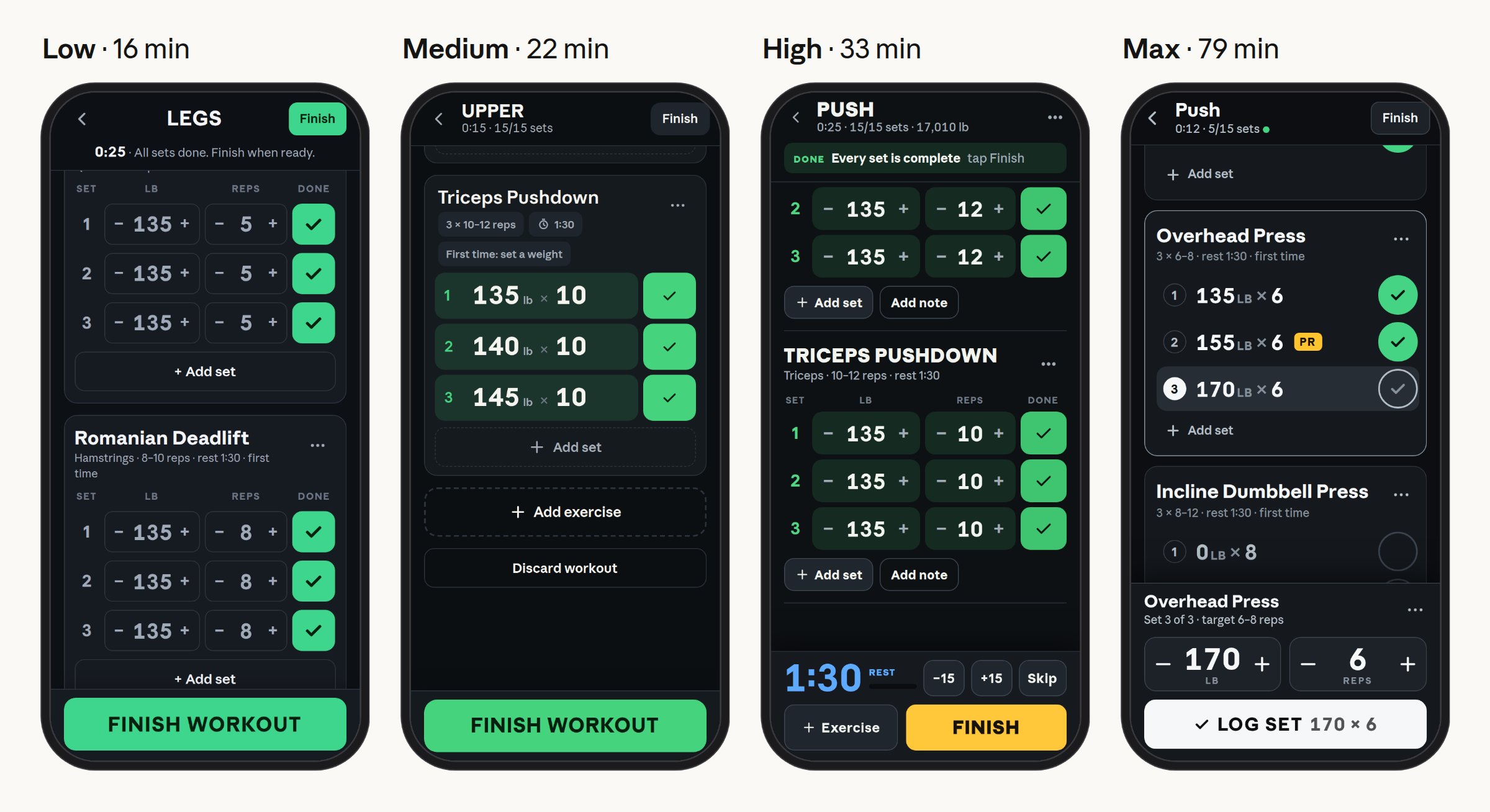
5. Thariq's four steps for building a new feature
- Hand over the spec and have Claude ask questions to fill in missing details.
- Build the first implementation with
/effort low. - Check that it captured the core of the requirements, and iterate at low if needed.
- Once the direction is right, hand off verification and testing with
/effort high.
Interaction is more efficient when you split the stretch where a person quickly sets direction from the stretch where the model checks deeply.
6. Benchmark problems are much bigger than everyday work
Terminal-Bench 3.0 is a community-contributed benchmark of terminal tasks. It covers security, hardware, ML, science, software, operations, and media problems. The v3.0.0 release contains an initial 74 tasks.
| Area | Task | Required work |
|---|---|---|
| Hardware | retro-console-soc | Build a Verilog 8-bit game console that fits a small FPGA and display a test ROM |
| Science | takens-embedding-lean | Formally prove the Takens embedding theorem in Lean 4 |
| ML | mp-checkpoint-consolidation | Merge 16 mixture-of-experts checkpoint shards and reproduce reference logits |
| Operations | intrastat-meldung | Handle an EU month-end trade statistics filing from scratch |
| Media | layout-config-recreation | Recreate a poster image as an editable layout |
7. A 2-minute filter and a 33-minute filter
html-js-filter is a task to remove ways of sneaking JavaScript into HTML. Fable 5.1 passed 1 of 5 runs at low and all 5 at xhigh. At low, it wrote the filter once in about 2 minutes and tested it on a single page. The high-effort runs spent about 33 minutes reviewing their own draft as if attacking it, found bugs in the installed parser's source, and used standard XSS tests plus a fuzzer they wrote themselves. For high-stakes work like security review or performance optimization, spending this many tokens is worth it.
8. Raising effort rarely fixes the wrong direction
In a comparison of 370 runs each for Fable 5.1, median tokens went from 73k to 222k and passing runs from 140 to 214. When you break out failure types, the ability to check more and the ability to pick the right direction turn out to be different things.
| Failure type | low | max |
|---|---|---|
| Missed edge cases | 59 | 24 |
| └ Bugs the tests missed | 40 | 14 |
| Judgment errors | 133 | 107 |
| └ Misunderstood requirements | 45 | 26 |
| └ Wrong or incomplete fixes | 31 | 10 |
| └ Domain rule errors | 32 | 24 |
| └ Chose the wrong interpretation | 25 | 47 |
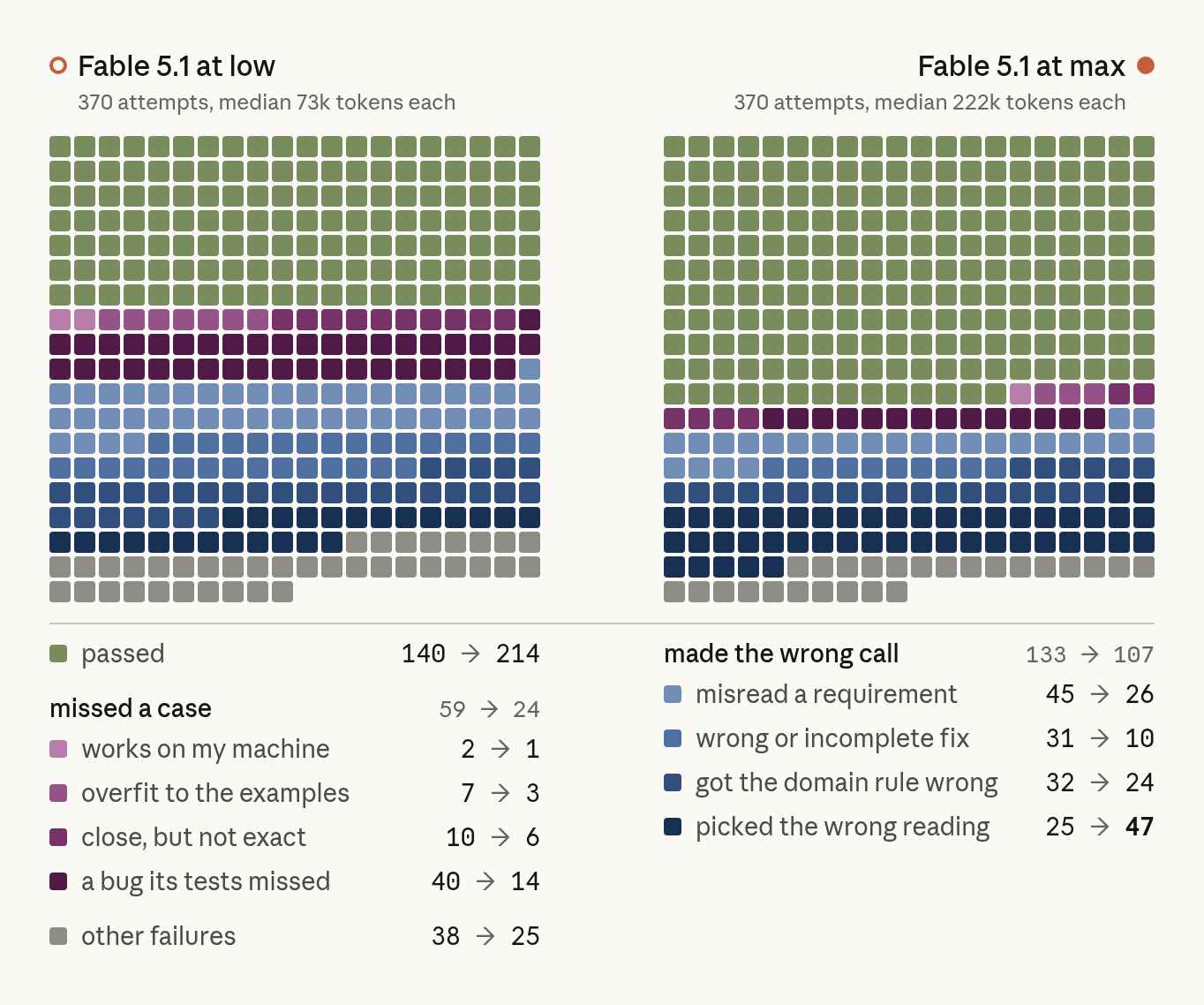
Missed edge cases dropped, but choosing the wrong interpretation rose from 25 to 47. High effort can check more carefully, but it does not set the direction for you. That is why you align goals and constraints through an interview first.
9. Hardware 34% → 75%: effort helps most in hard areas
Fable 5.1's pass rates by area, going from low to the top effort levels, were hardware 34%→75%, security 64%→87%, ML 54%→73%, science 41%→61%, software 43%→56%, media 18%→30%, and operations 12%→22%. Problems that follow fixed rules, like operations, still scored low.
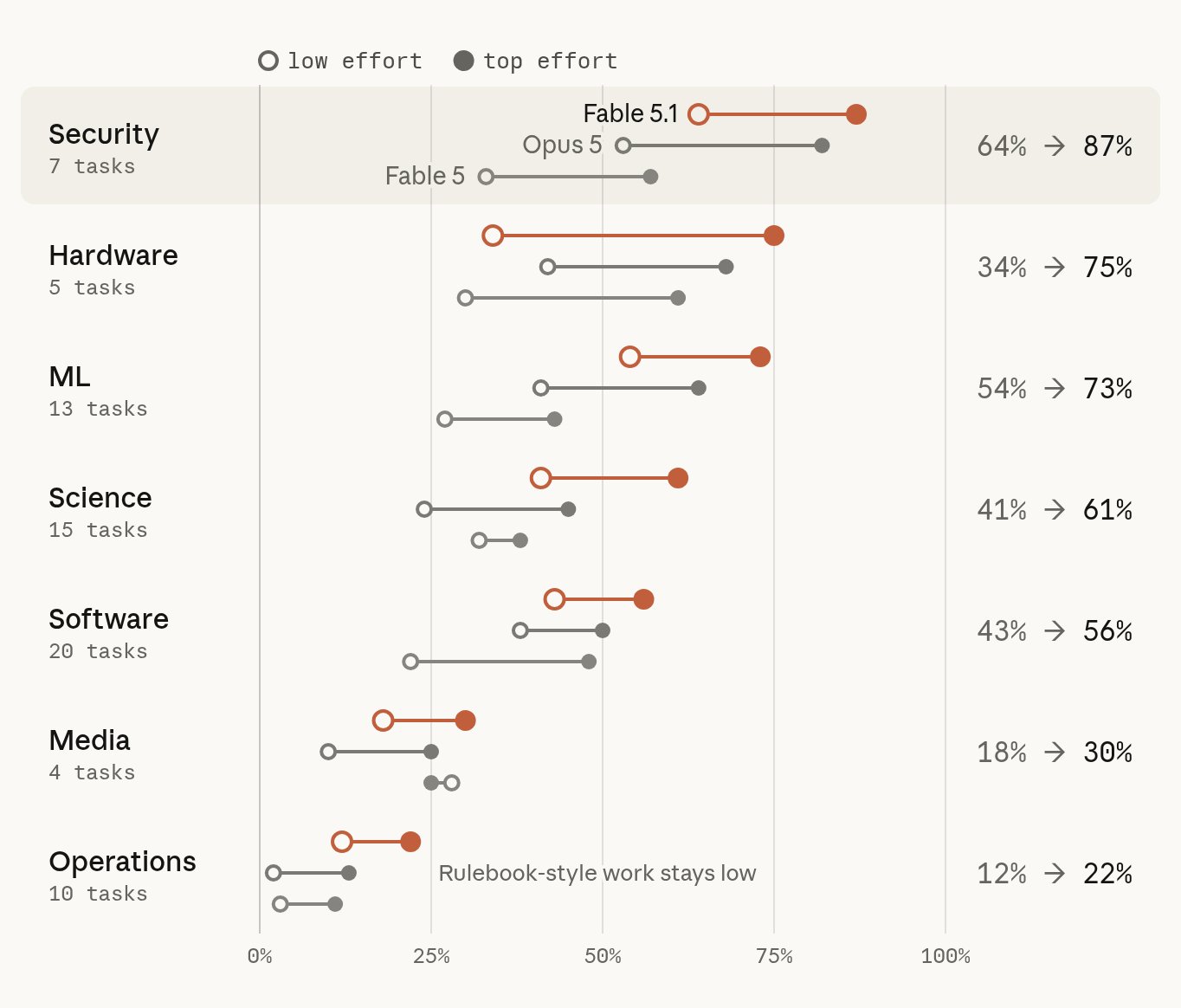
On the storage engine bug mvcc-lsm-compaction, Opus 5.5 at low changed the code before building and reproducing, finished in about a minute, and scored 0/5. At xhigh, it spent about 11 minutes reproducing the crash first and checking that the test failed on the partly fixed code, and passed 4/5.
10. With no one to ask, high tries it two ways
On the linear programming solver cli-2ph-simplex, low stopped at around 10k tokens and warned that it might be slow on large inputs. High timed the run on a large problem and changed its search method, going from 0/5 to 5/5.
On the protein analysis task gsea-proteomics, high compared two preprocessing methods, noticed the difference in results, and picked the right method, going from 0/5 to 4/5. When a person is around, you can ask them to choose, but when it has to run alone, it can be better for high to test both approaches.
11. Thariq uses max in effectively two cases
He uses low far more often, and uses max when handing something off autonomously with almost no input, or when hunting for security vulnerabilities.
| Level | Best-fit work |
|---|---|
| low | Brainstorming, sketches, easy fixes |
| medium | Most everyday development, such as new features |
| high | Work where verification matters or there are many edge cases, fixing bugs in old code |
| max | Building and verifying autonomously from scratch, finding security vulnerabilities in critical software |
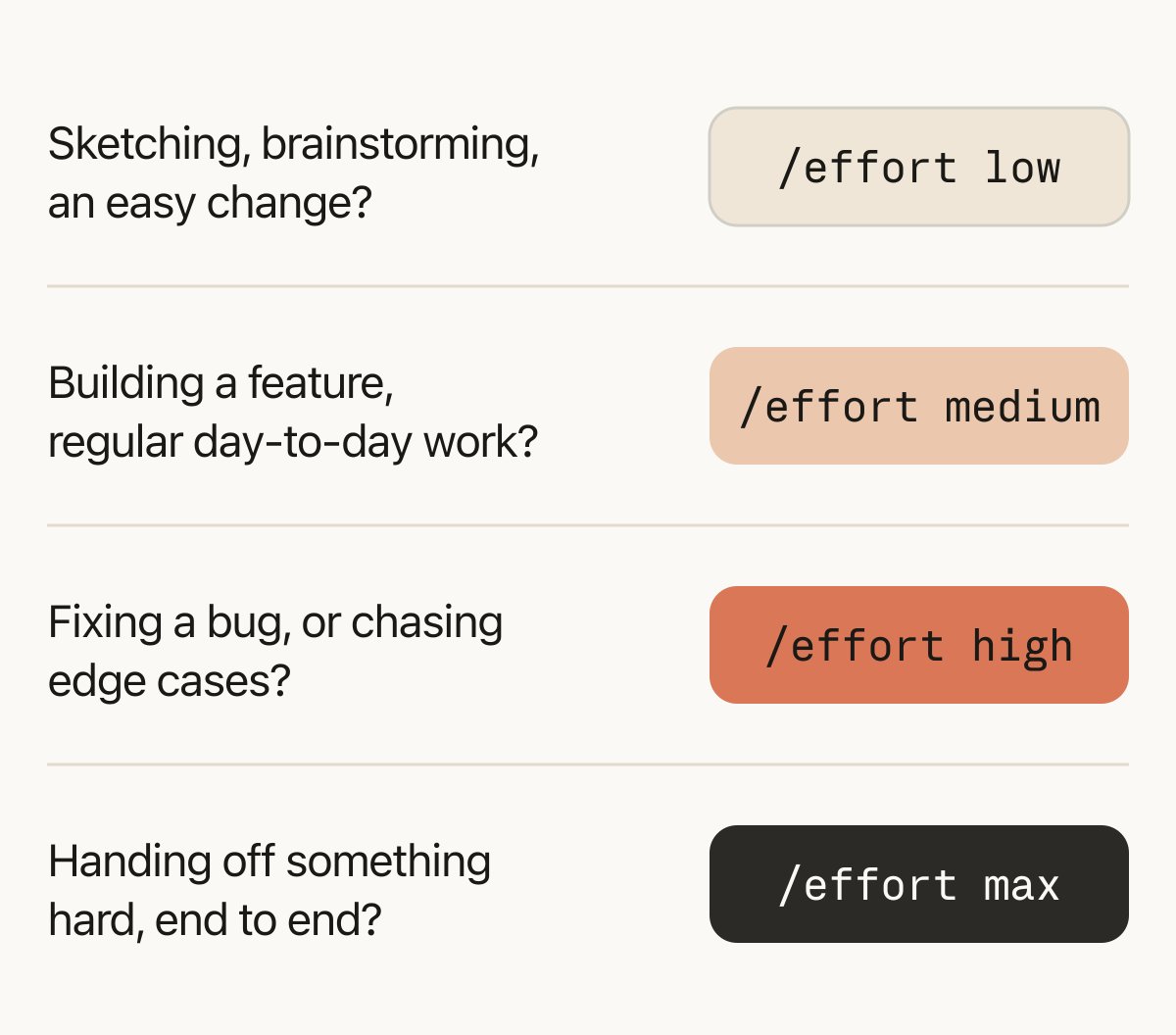
Source: X @trq212 · He explains that he uses low far more often, and max only when he does not want to give any input or when finding security vulnerabilities.
How to change effort in Claude Code
Set it with /effort low, /effort medium, /effort high, /effort xhigh, or /effort max. /effort auto returns to the model default. Typing /effort with no argument opens a slider, where you pick with the left and right arrows and press Enter. Max applies only to that session.
You can set a value to keep using with effortLevel in settings.json. The environment variable CLAUDE_CODE_EFFORT_LEVEL also works, and the environment variable takes the highest priority. Supported levels can differ by model. With the latest models, changing the level mid-conversation does not break the prompt cache.
Claude Code commands · interactive mode · environment variables
Try it on your next task
Start your next task with /effort low. If the output is headed the right way, raise it to /effort high and hand off the testing.
Official resources and sources
- Thariq Shihipar, "Using Claude Code: Spending your effort" X Article · Interactive article (September 26, 2026, 5:04 AM KST)
- Thariq's follow-up reply on using low and max (September 26, 2026, 5:07 AM KST)
- Terminal-Bench v3.0.0
- Claude Code commands · interactive mode · environment variables