At 2 AM (KST) on September 2, 2026, Google launched agentic video understanding in the Gemini API. Add the single line "processing": "agentic" to a video input, and the model decides for itself what to look at, at what rate, and whether to use frames, audio, or captions, pulling in only the parts it needs. Google cited up to 88% fewer tokens, up to 66% lower cost, and up to 7% higher accuracy. It is available in Google AI Studio and the Gemini Enterprise Agent Platform with no added feature fee.
Source: X @GoogleDeepMind
How agentic video understanding differs
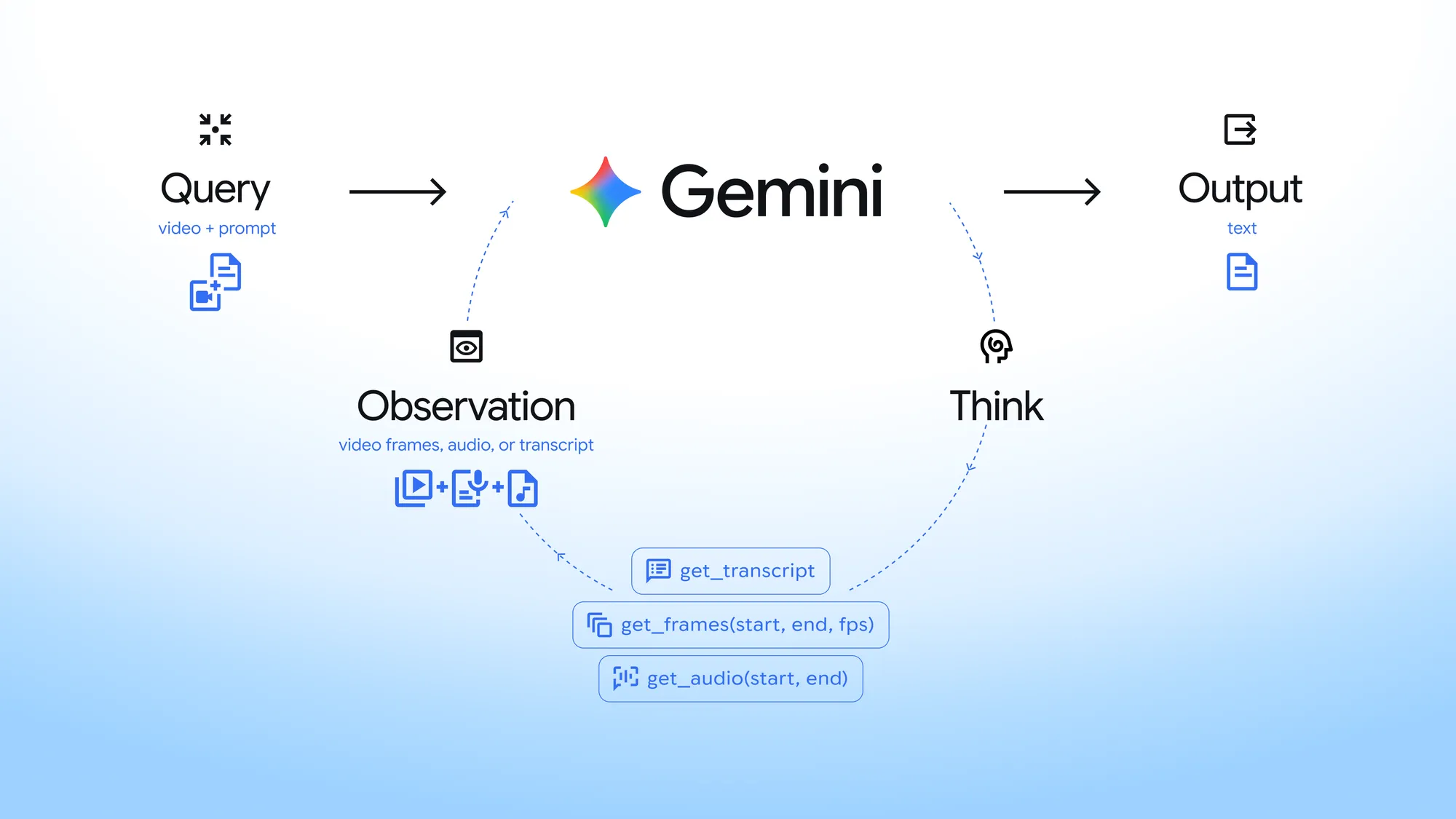
The existing static mode feeds in the whole video at a fixed interval, by default 1 FPS. Agentic mode repeats Think → Act → Observe to find the parts needed for the question. It starts by receiving a lightweight reference to the video, such as its length, format, and file ID, and if speech is the main content, it checks the captions first. When it needs the picture, it fetches only that segment and adjusts the frame rate, and if sound matters, it reads the audio.
For example, it can re-watch fast-moving scenes at 5 to 10 FPS, and scan the broad flow of a long video at 0.1 FPS. The model handles caption lookup, extracting frames between specific start and end points, and checking the audio for that segment. In the response's steps, you can see processing_call and processing_result.
Source: X @GoogleAIStudio
Benchmarks: up to 88% fewer tokens, up to 7% higher accuracy
Using Gemini 3.7 Flash, it compared static and agentic results on three benchmarks.
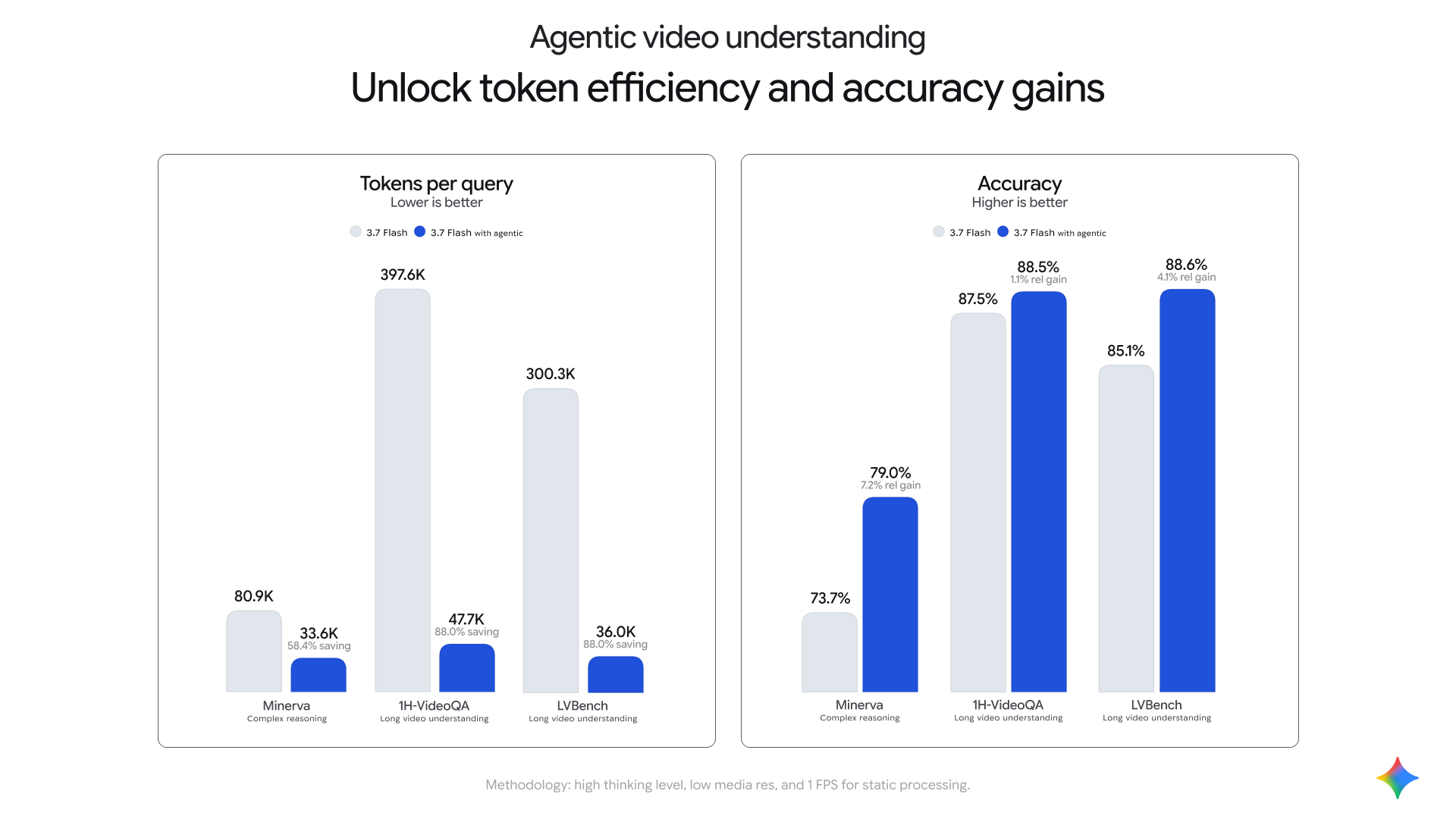
| Benchmark | Tokens (static→agentic) | Token reduction | Accuracy (static→agentic) |
|---|---|---|---|
| Minerva | 80.9K→33.6K | 58.4% | 73.7%→79.0% |
| 1H-VideoQA | 397.6K→47.7K | 88.0% | 87.5%→88.5% |
| LVBench | 300.3K→36.0K | 88.0% | 85.1%→88.6% |
Test conditions were high thinking, low resolution, and static at 1 FPS. In the 1H-VideoQA comparison, Gemini 3.7 Flash with agentic on had the highest accuracy among the compared models on the lower query cost side.
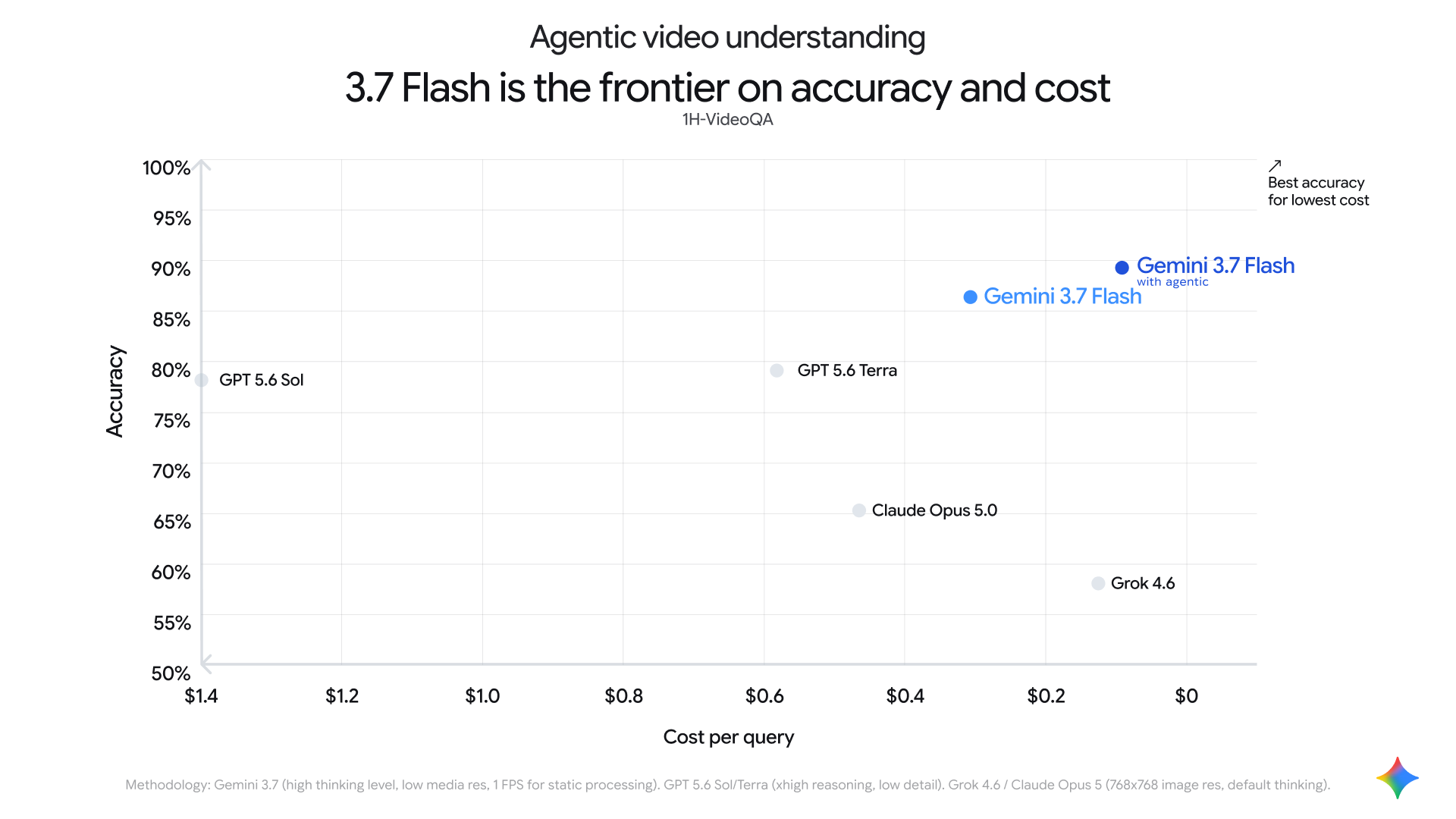
The savings grow with longer videos, from a 10-minute how-to video to a 90-minute lecture to several hours of recordings.
What you can do with it
- Find sub-second moments: find cut boundaries and auto-edit candidates that 1 FPS misses.
- Search for a specific scene in a multi-hour video: find the part you want without feeding the whole video in as millions of tokens.
- Detect anomalies: recheck suspect segments at a high frame rate.
- Count actions and objects: follow actions in the video and count how many times they happen.
Source: X @googleaidevs
Companies that tried it first
- Ponder: Replaced its own pipeline for finding usable scenes in raw footage with a single call. At the same recall, input tokens were about 3.5 times lower.
- Revyl: Develops and tests iOS and Android apps on cloud devices with agents. It caught fast screen transitions that screenshot verification missed, so it could test animation-heavy apps too.
- Resemble AI: On about 1,000 labeled videos and a real-time deepfake detection task, long-video descriptions were more accurate than with its previous Gemini setup, and input tokens fell 57%.
- Mosaic: In editing evaluations, median input tokens fell 97% and the constraint satisfaction rate roughly doubled. It was the only mode that processed a 4.5-hour podcast to the end.
How to use processing agentic in the Gemini API
At the September 2 announcement, three models were supported: Gemini 3.7 Flash, 3.6 Flash, and 3.5 Flash-Lite, and Gemini 3.8 Flash, released September 3 (KST), was added afterward. The examples use the Interactions API of the Python Google Gen AI SDK.
1. Upload a file, then process agentically
import time
from google import genai

client = genai.Client()

# Upload a video
video_file = client.files.upload(file="path/to/lecture.mp4")
while video_file.state.name == "PROCESSING":
    time.sleep(2)
    video_file = client.files.get(name=video_file.name)

# Use agentic video processing
interaction = client.interactions.create(
    model="gemini-3.8-flash",
    input=[
        {
            "type": "video",
            "uri": video_file.uri,
            "mime_type": video_file.mime_type,
            "processing": "agentic"
        },
        {"type": "text", "text": "What are the three main arguments presented?"}
    ]
)
print(interaction.output_text)
print(interaction.usage.total_tokens)
You can check the tokens used for each request right away with usage.total_tokens.
2. Mix agentic and static in one request
interaction = client.interactions.create(
    model="gemini-3.8-flash",
    input=[
        # 45-minute reference match: process agentically
        {
            "type": "video",
            "uri": full_match_file.uri,
            "mime_type": "video/mp4",
            "processing": "agentic",
        },
        # 10-second query clip: process statically
        {
            "type": "video",
            "uri": highlight_snippet_file.uri,
            "mime_type": "video/mp4",
            "processing": "static",
        },
        {
            "type": "text",
            "text": "Find the exact timestamp in the full recording where the highlight sequence occurred.",
        },
    ],
)
print(interaction.output_text)
3. Analyze a public YouTube URL
interaction = client.interactions.create(
    model="gemini-3.8-flash",
    input=[
        {
            "type": "video",
            "uri": "https://youtu.be/7Z5Vy9JBANs",
            "processing": "agentic"
        },
        {
            "type": "text",
            "text": "What are the 3 most important announcements in this keynote?",
        },
    ],
)
print(interaction.output_text)
Supported formats are MP4, MPEG, MOV, AVI, FLV, MPG, WebM, WMV, and 3GPP. The Files API allows up to 20GB on paid and up to 2GB on free, and files registered from Cloud Storage can be up to 2GB each. Inline input is under 100MB and suits short videos. A 1M-context model handles up to about 3 hours at low resolution and up to about 1 hour at high resolution. Public YouTube URLs are supported, and the free tier allows up to 8 hours per day.
How to choose between agentic and static
| Mode | When to choose it | Examples |
|---|---|---|
| agentic | Videos over 5 minutes, finding a specific moment or fast action precisely, finding by captions and confirming on screen | Lectures, webinars, earnings calls, sports games, broadcast archives |
| static | Response speed matters on short clips, or you need to look at the whole thing frame by frame | Product GIFs, UI animations, social clips |
Google's guide recommends starting with agentic. For short videos, you can choose by comparing the delay of the agentic exploration step with the fast bulk analysis of static.
Pricing
There is no added fee for the agentic feature itself. The base model pricing applies, and the video frames and audio actually pulled in, the initial reference input, and the model's reasoning and tool calls are billed by tokens. If you reuse the same video across several turns, implicit caching may apply, and you can use explicit caching too. Processing through the Batch API costs 50%.
It is coming to the Gemini app and Ask YouTube too
Google said it will soon extend this feature to the Flash and Flash-Lite models in the Gemini app, and apply it to Ask YouTube on YouTube watch pages in the coming months.
Source: X @patloeber
Related posts
You can read more Gemini model news in Google ships another new model in 3 weeks: Gemini 3.7 Flash at half the price and Gemini 3.7 Flash ARC-AGI verified score and pricing. The way it follows a question through a video and does the work it needs also ties to the agent concept in coding agent.