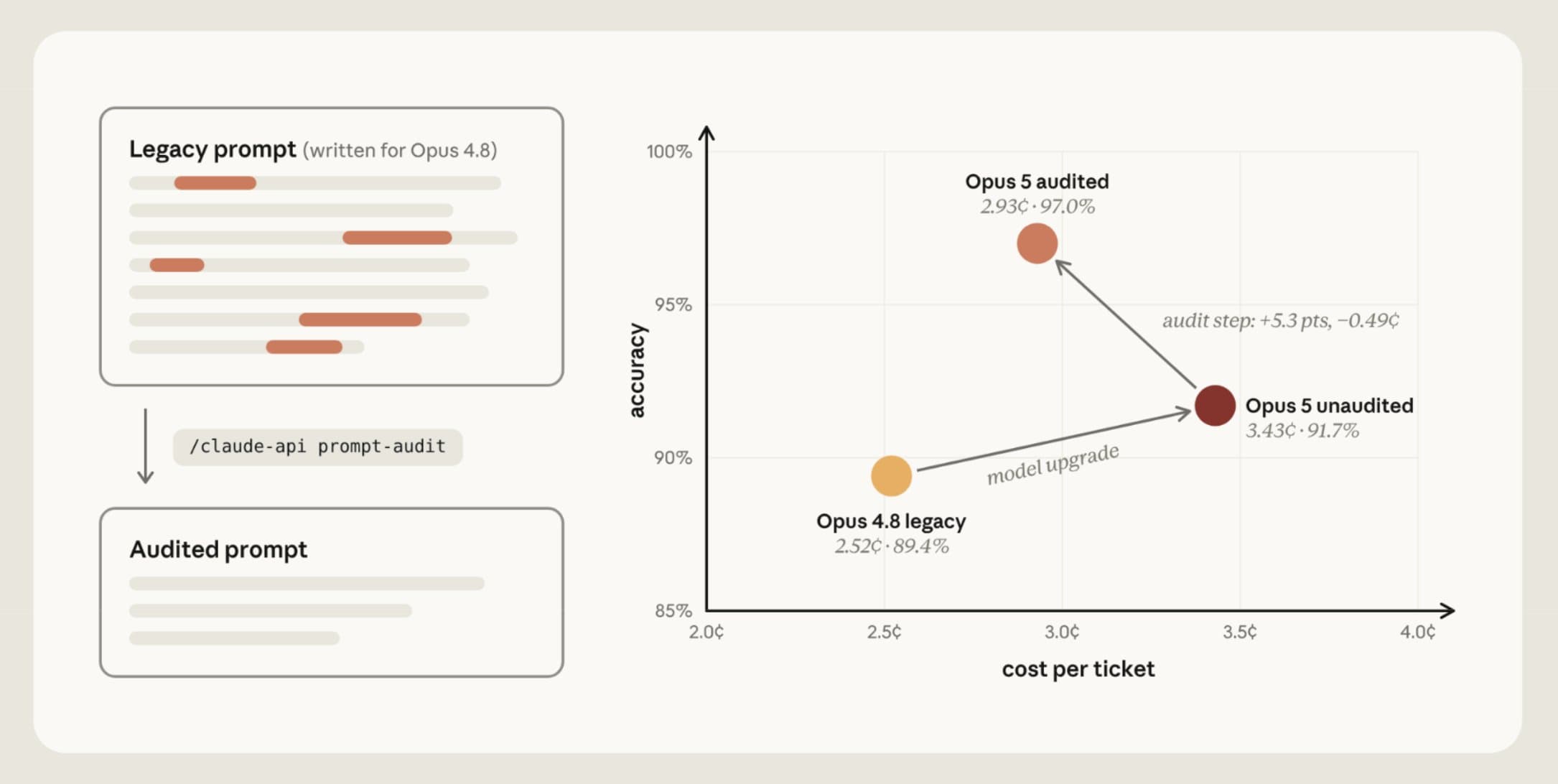
The tip Anthropic's Lance Martin shared on September 23, 2026 at 10:47 AM (KST) is simple. If you use Opus 5.5 in Claude Code, run /claude-api prompt-audit once now. It scans your CLAUDE.md, AGENTS.md, skills, and prompts for instructions tuned to older models, and returns what to change and why as a report and a diff of proposed edits.
Source: X @RLanceMartin
How to run it
In the latest Claude Code, just type /claude-api prompt-audit. It is a skill included in the Bundled skills section of Anthropic's official docs, so you do not need to install a separate plugin. If you need an update, run claude update in your terminal.
The same check can also be called with /doctor prompt-audit in Claude Code v2.1.283 or later. /checkup is an alias for /doctor, and you can narrow the scope by adding a folder to check, for example /doctor prompt-audit src/agents.
Lydia Hallie of the Claude Code team noted that the command name can make it sound like it is only for API work, but you can use it on Claude Code config files too.
Source: X @lydiahallie
What it gives back
You get two things. First, an audit report that points to files and line locations and explains what the pattern is, why it is outdated for the target model, and how confident the judgment is. Second, a concrete diff of fixes you can apply. It does not stop mid-audit to ask for confirmation, and it finishes the report and proposals.
The default behavior stops at proposals. The official guide states the working principle: "Propose - never apply edits without the user's consent." After reading the report, just follow up with "apply it" for the changes you agree with.
6 anti-patterns it flags
Verification rituals. Sentences like "double-check your work" or "verify twice before answering," which make the model repeat the same check with no result-based criterion. Redundant checks pile up, using more tokens and repeating work.
Thoroughness and emphasis boosters. Stacking strong wording like "be as thorough as possible" or "CRITICAL: YOU MUST ALWAYS…" can lengthen responses and add unneeded tool calls. It is better to state the requirements that really matter in plain, specific terms.
Fixed procedures and scratchpad templates. Forcing the same thinking process on every problem, such as "think step by step in a scratchpad," stacks extra instructions on top of the model's default reasoning. State the result you need and the verification criteria directly.
Outdated examples. Long few-shot examples added so an earlier model would not slip up may now be unnecessary. The model can pick up the examples' reasoning style too, answering wordily even to simple requests.
Conflicting rules. Rules that cannot be followed at the same time, such as "always refund within policy" and "do not refund without escalation." Newer models follow instructions more literally, so priorities and exceptions need to be clear.
Outdated settings. Settings tuned to earlier model generations, such as a manual thinking budget, may be rejected by the latest API or behave differently than intended. Recheck them against the current docs for your target model.
The scope of the audit goes beyond prompt sentences. It also looks at general-knowledge explanations in skill files, lines that turned a single mistake into a permanent rule, and paths and versions that go stale quickly. Behavior instructions inside tool descriptions, fake conversation examples, and request settings are also covered. On the other hand, context only the author knows, such as the product, environment, audience, quality bar, and the reasons behind constraints, should stay. It does not delete something just because it is long.
Source: X @RLanceMartin
Before and after
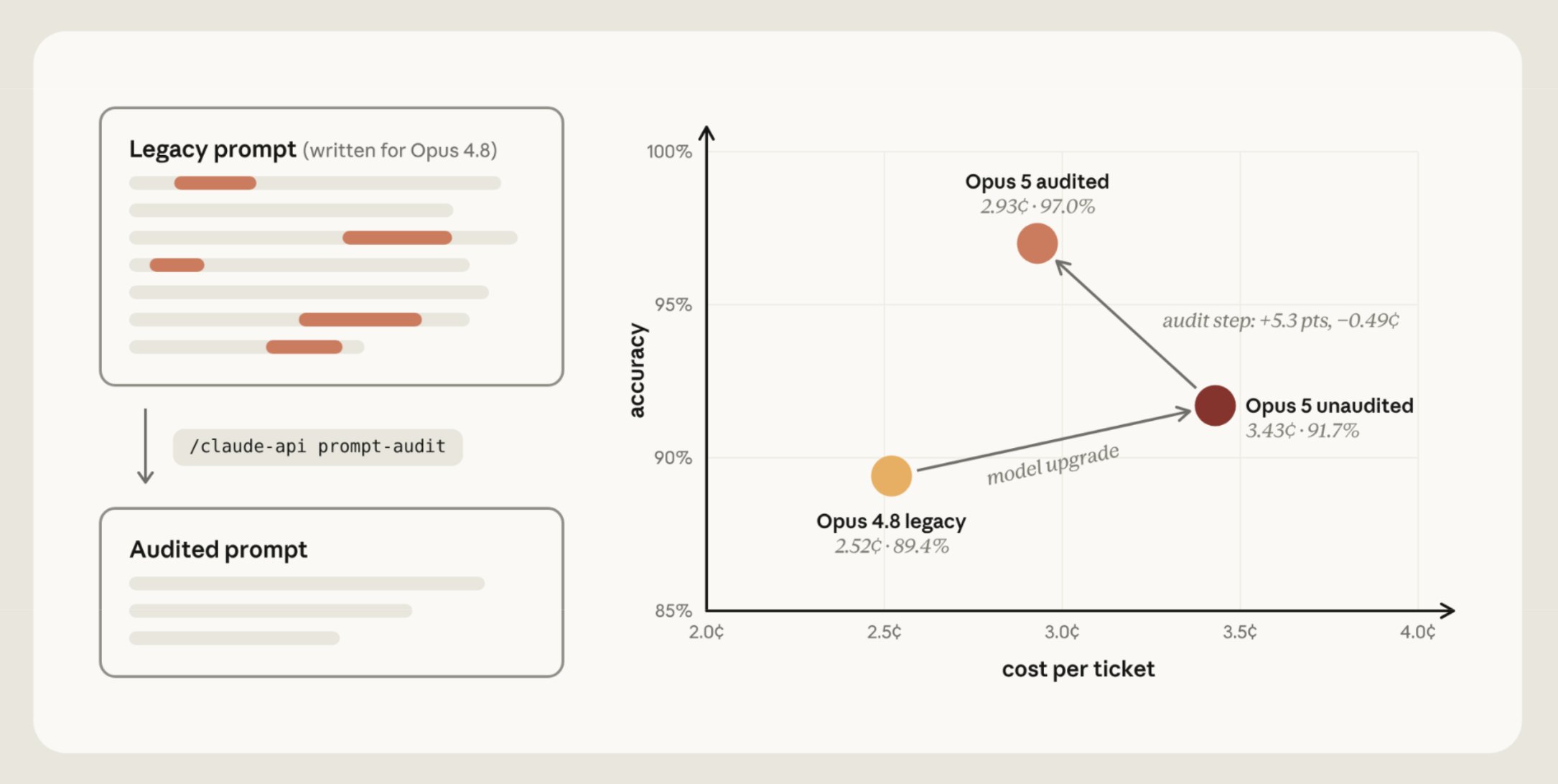
In an Anthropic internal customer support benchmark that Lance Martin published, moving a prompt written for Opus 4.8 straight to Opus 5 changed cost per ticket from 2.52 cents at 89.4% accuracy to 3.43 cents at 91.7%. After prompt-audit, it was 2.93 cents per ticket at 97.0% accuracy. Compared with Opus 5 before the audit, accuracy rose 5.3 percentage points and cost fell 0.49 cents. This is one case from an internal benchmark, so not every project will see the same numbers.
The team cited cases where redundant verification instructions made the model repeat the same work, and where emphasis boosters triggered dozens of unneeded searches. To look at Opus 5.5 cost and effort settings together, you can also see the Claude Code effort guide.
/claude-api migrate, announced alongside
In the Opus 5.5 launch notes, Lance Martin introduced /claude-api migrate together with prompt-audit. Migrate first confirms the target files or folders and the target model, then moves application code over to the new model. It then audits the prompts and tool descriptions in the same scope using the prompt-audit criteria.
Source: X @RLanceMartin
The commands described in the official claude-api skill docs are as follows.
| Command | What it does |
|---|---|
prompt-audit | Audits prompts, skills, tool descriptions, and related settings, and proposes a report and fixes |
migrate | Moves Claude API code to the target model and audits prompts in the same scope |
upgrade | Guides you through a major version upgrade of the Python anthropic SDK |
managed-agents-onboard | Guidance for adopting Claude Managed Agents |
cost-optimize | Analyzes where you can lower API cost while keeping quality |
The skill's name and subcommand list may be updated, so you can see the latest description in the claude-api doc in Anthropic's skills repo.
Related posts
If you have gathered design references in your project's CLAUDE.md, also check that the new instructions do not duplicate or conflict with each other. 8 design reference sites for Opus 5.5 and Claude Code frontend work shows how to put a reference list into CLAUDE.md.