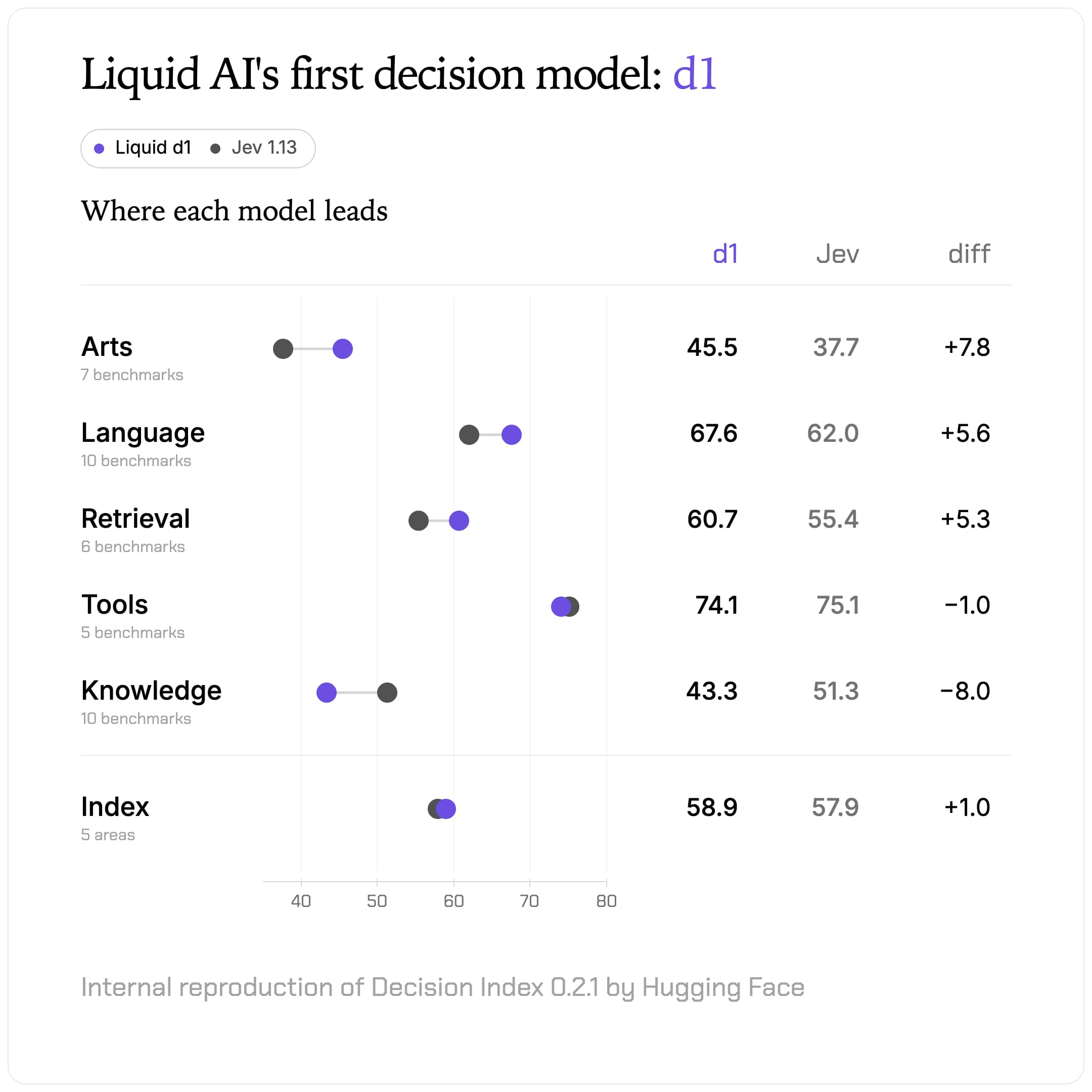
It really is all turning into Jev. After OpenAI released its GPT-6 Luna-based Decisions API, Liquid AI announced d1, its first decision model, on September 30 at 3:35 AM (KST). d1 does not generate long text; it classifies, selects, and scores among set options, and its output tokens are 0. Liquid AI says d1 is the first model to beat Jev on the Hugging Face Decision Index.
What Liquid AI d1 is: a decision model that returns decisions instead of sentences
d1 takes a state and a question and returns the probabilities of preset answers in a single call. It does no ordinary text generation, so the output_tokens value in the official example response is 0.
Liquid AI says d1 leads in multilingual evaluation, is more robust against prompt injection, and handles long inputs better. It also presented fast, structured decision-making in software environments as a use.
Source: X @liquidai
First to beat Jev on the Hugging Face Decision Index
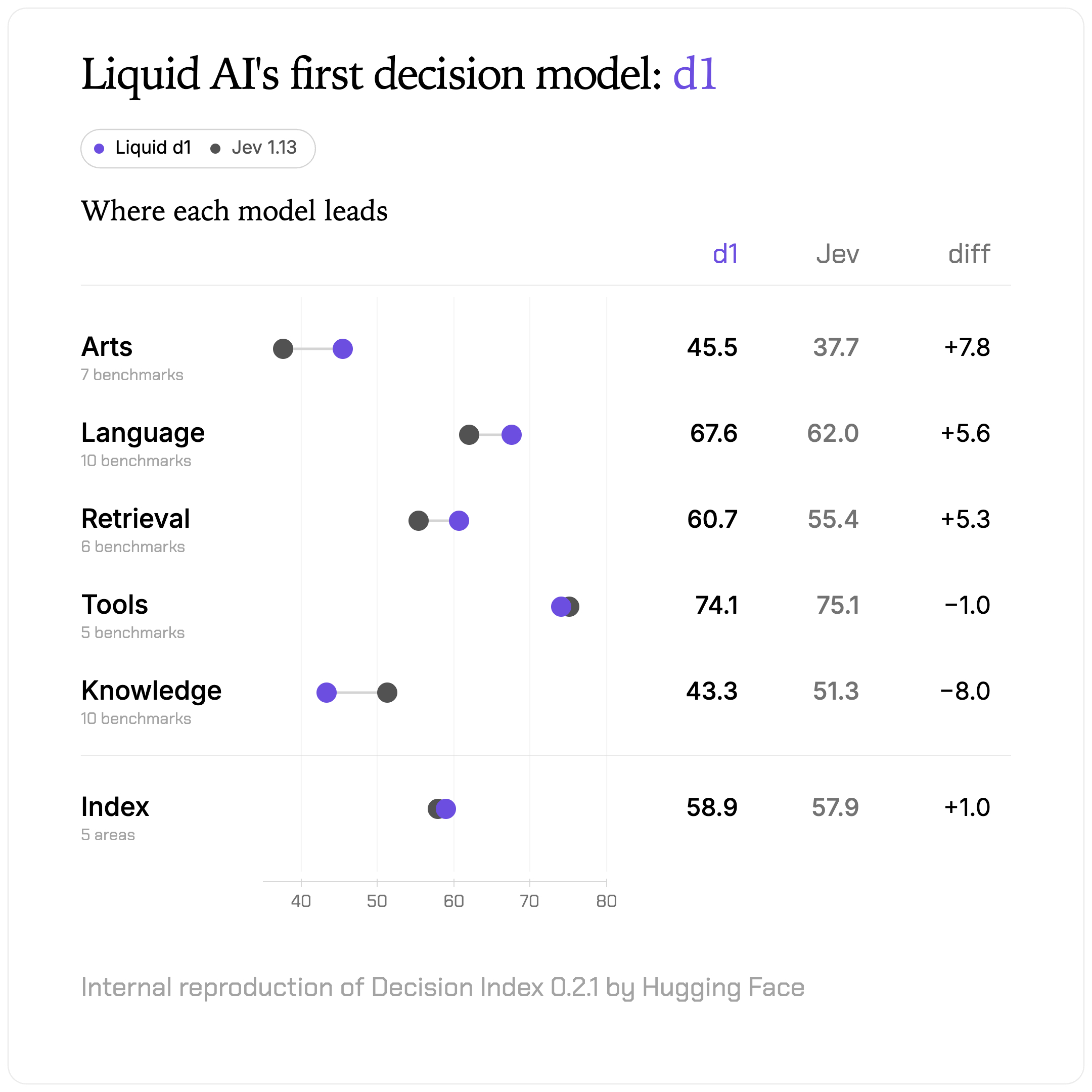
In the comparison table Liquid AI published, d1 scored higher than Jev 1.13 in three of five areas: Arts, Language, and Retrieval. Jev led in Tools and Knowledge, and the overall Decision Index is 58.9 for d1 and 57.9 for Jev.
| Area | Benchmarks | d1 | Jev 1.13 | Difference |
|---|---|---|---|---|
| Arts | 7 | 45.5 | 37.7 | +7.8 |
| Language | 10 | 67.6 | 62.0 | +5.6 |
| Retrieval | 6 | 60.7 | 55.4 | +5.3 |
| Tools | 5 | 74.1 | 75.1 | −1.0 |
| Knowledge | 10 | 43.3 | 51.3 | −8.0 |
| Decision Index | 5 areas | 58.9 | 57.9 | +1.0 |
As noted at the bottom of the chart, these values are Liquid AI's reproduction of Hugging Face Decision Index 0.2.1. You can see the evaluation setup on the Hugging Face Decision Index leaderboard.
Three question types: Noul, Choice, Score
| Type | What it returns | Example |
|---|---|---|
| Noul | Yes/no probability (0 to 1) | Is this message spam? |
| Choice | One named option, with a probability for each option and a confidence | Which department will handle this inquiry? |
| Score | The probability-weighted position on an ordered rubric and the probability of each level | How urgent is this request? |
The answer to each question comes back in a fixed type. You can also put several questions of different types in one request and process them together.
How to use Liquid AI d1: from getting an API key to your first call
- Sign up at console.liquid.ai and join an organization.
- Go to API Keys in the Dashboard.
- Create a key and copy it. The key starts with
liquid_, and you keep it in an environment variable.
export LIQUID_API_KEY="liquid_xxxxxxxxxxxxxxxxxxxxxxxxxxxxxxxxxxxxxxxxxxxxxx"This is the first-call example from the official docs.
curl -s https://api.liquid.ai/decisions/v1/systemone \
  -H "Authorization: Bearer $LIQUID_API_KEY" \
  -H "Content-Type: application/json" \
  -d '{
    "model": "d1:free",
    "state": "I have been waiting over three weeks for my order and nobody has responded to my emails. This is completely unacceptable.",
    "questions": {
      "is_complaint": {
        "type": "noul",
        "instructions": "Is this message a complaint from the customer?"
      }
    }
  }'
The noul value of 0.999 in the response is the probability that the message is a customer complaint, and output_tokens is 0.
{
  "model": "d1:free",
  "answers": {
    "is_complaint": {
      "type": "noul",
      "noul": 0.999
    }
  },
  "usage": {
    "input_tokens": 84,
    "output_tokens": 0
  }
}
Install the Python SDK with pip install typesafe-sdk and the TypeScript SDK with npm install @typesafe-ai/sdk. Both SDKs use TypeSafeClient, and you set the base URL to https://api.liquid.ai on the same client as Jev.
Liquid AI researcher Maxime Labonne introduced the d1 checkpoint as free to try, comparing decision models to the BERT days of 2020.
Source: X @maximelabonne
What to use it for: a rule for moving LLM calls to d1
The decision model docs list classification, routing, scoring, triage queue cleanup, content moderation, guardrails and safety checks, replacing an LLM judge, approving agent tool calls, and model routing as good fits. The rule is simple. If the answer is one of N options you set in advance, use a decision model, and if you need to write new sentences, use a language model.
| Comparison | Language model call | Decision model |
|---|---|---|
| Output | Generated tokens to parse | A decision with probabilities |
| Latency | Grows with output length and reasoning | Low and predictable |
| Output tokens | Even a one-word answer uses tokens | 0 |
| Uncertainty | None, or the model reports a number itself | Calibrated probabilities on every answer |
| Schema errors | Broken JSON can appear | Returned in a fixed format |
| Multiple decisions | Sequential calls | Processed in parallel in one call |
Language models handle tasks that need new sentences, such as writing, summarization, code generation, open-ended question answering, multi-turn conversation, and multi-step reasoning.
Demo: Road Decider, where d1 and Jev compete
Road Decider is a pixel-art racing game about surviving on a three-lane road. Two cars run the same road, you have three lives, and there is no finish line. Depending on game speed, it sends d1 a Choice question 2 to 5 times per second to pick one of LEFT, CENTER, or RIGHT.
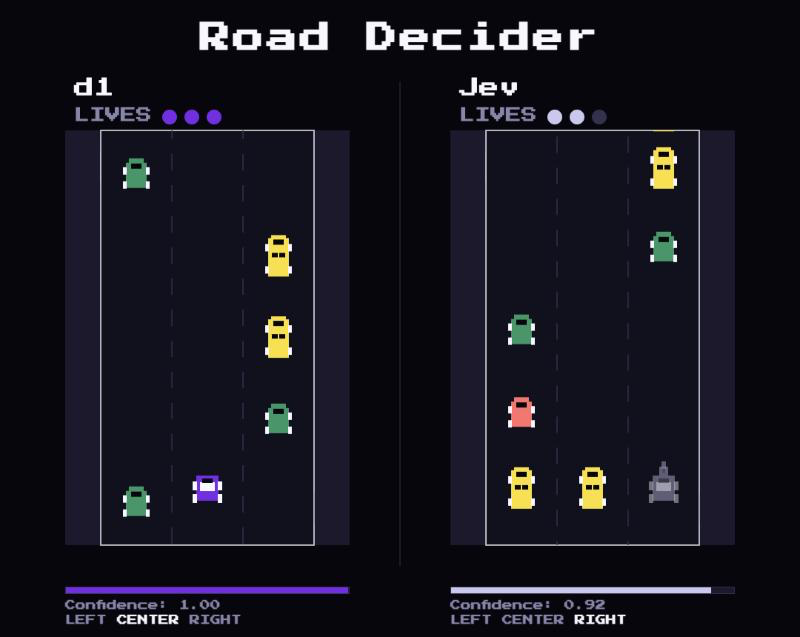
In You vs d1 mode, you move yourself with the arrow keys and start with Enter. Jev vs d1 mode uses an OpenRouter key, and the default Jev model is typesafe/jev-1.13. You need Node.js 18 or later and a Liquid API key.
git clone https://github.com/Liquid4All/cookbook.git
cd cookbook/examples/road-decider
cp .env.example .env
# Edit .env: add LIQUID_API_KEY, and optionally OPENROUTER_API_KEY
npm install
npm run dev
After starting the dev server, open the local address to begin racing.
Source: X @liquidai
Two weeks after Jev: OpenAI, Ollama, and Liquid AI too
Jev was released on September 16 at 3:17 AM (KST). The new approach of a decision model that makes set choices quickly drew attention.
Source: X @CompleteSkeptic
On September 29, OpenAI released the GPT-6 Luna-based Decisions API at DevDay. We covered the details in OpenAI Decisions API: Two Weeks After Jev, GPT-6 Luna Picks an Option in 0.15 Seconds.
On September 30 at 1:25 PM (KST), Ollama announced support for local decision models. You start with ollama pull nimble and use the local /v1/systemone API. Nimble, Tev1 4b, and Tev1 0.8b are available, and you can apply them to ticket triage, model routing, and content moderation. You can find details on the official Ollama blog and in the docs.
Source: X @ollama
The same day, Liquid AI also released its first decision model, d1. Just two weeks ago Jev was a novelty, and now everyone from OpenAI to Ollama to Liquid AI is moving the same way.
Related posts
- OpenAI Decisions API: Two Weeks After Jev, GPT-6 Luna Picks an Option in 0.15 Seconds
- Run Unsloth Laya Locally: An AI Decision Model on a 4GB RAM PC With a Jev-Compatible API
- CLM-8B, a decision model up to 9x faster than Jev: how it works and how to use it