

Pi, a powerful coding agent harness, has long refused to support MCP. Now it does, and it is pairing that support with Codemode and Jev. Codemode solves MCP's weaknesses, wasted context and hard-to-chain results, with code, while Jev, a classifier-only model, handles the job of reading and judging large volumes of data.
On September 30, 2026, at 2:51 a.m. KST, Pi announced on its official X account that MCP is now part of its core. The same day, Earendil, the company behind Pi, published You Said No MCP!, explaining why it changed its position.
Source: X @pidotdev
Two reasons Pi rejected MCP
Until now, Pi did not support MCP, because Mario Zechner, who created Pi, was skeptical of it. MCP is an open standard, proposed by Anthropic, for connecting services like Figma, Notion, and Gmail to Claude Code or Codex. For more on what it means, see the MCP glossary page.
The first reason is context cost. In Mario Zechner's /context screen, a single Chrome DevTools MCP server with 26 tools takes up 18.0k tokens, or 9% of the entire context, before any work has started.
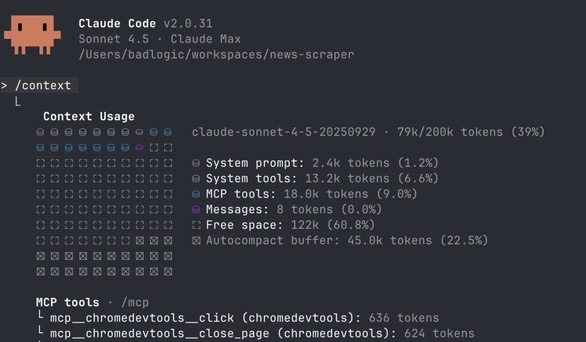
The second reason is composing results. If every tool result has to pass through the agent's context, it is hard to chain multiple steps together. So he chose Bash and code over MCP.
A change of mind after a year
Pi has now changed its position. MCP has changed over the past year, and there is no reason to stay tied to the old stance. At first Pi connected through the pi-mcp-adapter extension, but it has now moved MCP support into Pi's core.
Earendil cites Armin Ronacher's 2016 post Be careful about what you dislike to make the point that the world doesn't stand still. Even after Pi embraced MCP, the problem of composing tools remained. Codemode addresses that part.
Codemode: bundle tool calls into code
In Codemode, the model writes code that bundles several tool calls together. The code handles parallelism, loops, and branching, and only the final result returns to the conversation.
Anthropic introduced this approach first in its API in November 2025 under the name Programmatic Tool Calling (PTC). Claude writes Python code, which runs in a sandboxed container on Anthropic's side.
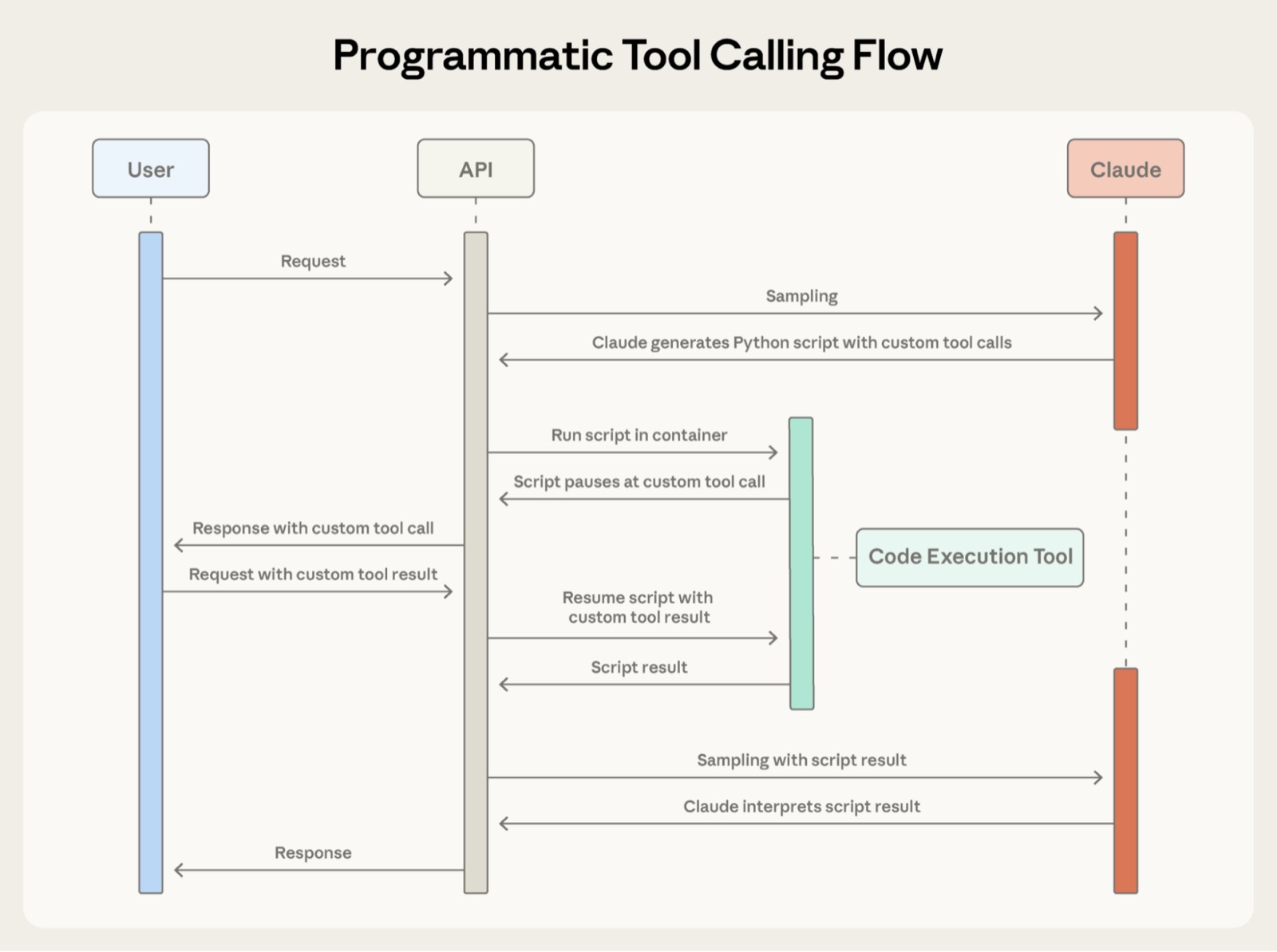
Pi runs the code itself in QuickJS, a small JavaScript sandbox inside the harness. The execution state is saved in the session history.
Here is how to turn on Codemode.
- Configuring MCP turns Codemode on automatically.
- You can ask Pi to reconfigure itself so Codemode is on.
- Add
+codemodetodefaultToolsin~/.pi/agent/settings.jsonor.pi/settings.json. - For a one-time run, start Pi with
pi --tools read,bash,edit,write,codemode. - Add a filesystem MCP server with
pi mcp add filesystem -- npx -y @modelcontextprotocol/server-filesystem ..
Adding Jev: finding the frustrated people in 167 Linear issues
Jev is a classification model TypeSafe released in September. It doesn't write text; it classifies. It has been available through Cloudflare AI Gateway since September 18, and its Workers AI model ID is typesafe/jev. The Cloudflare docs describe how it returns the chosen option along with a probability for each option.
In Earendil's example, you make a request to Pi like the first line below, and the model writes and runs Codemode code.
> Use typesafe/jev via codemode to find the most frustrated people on our issue tracker

const { issues } = await tools.mcp__linear__list_issues({
  team: "Pi", state: "open", limit: 250,
});
const jev = await models.getModelOfType(
  "classifier", "cloudflare-workers-ai", "typesafe/jev",
);
const questions = {
  frustration: {
    type: "choice",
    instructions: "Judge ONLY the emotional tone of the people writing. " +
      "Ignore how severe the bug is.",
    criteria: {
      none: "Neutral, factual, or friendly, even about a serious bug",
      mild: "Explicit annoyance, impatience, or disappointment",
      high: "Clearly angry, exasperated, sarcastic, or fed up",
    },
  },
};

const results = [];
let next = 0;
async function worker() {
  while (next < issues.length) {
    const issue = issues[next++];
    const { comments } = await tools.mcp__linear__list_comments({
      issueId: issue.identifier,
    });
    const c = await models.classify(jev, { state: { ...issue, comments }, questions });
    results.push({ id: issue.identifier, title: issue.title, ...c.answers.frustration });
  }
}
await Promise.all([worker(), worker(), worker(), worker()]);
store("frustration", results);

const score = (r) => r.probabilities.mild * 0.5 + r.probabilities.high;
const counts = {};
for (const r of results) counts[r.choice] = (counts[r.choice] ?? 0) + 1;
const flagged = results.filter((r) => r.choice !== "none");
flagged.sort((a, b) => score(b) - score(a));
return {
  total: results.length,
  counts,
  flagged: flagged.map((r) => `${r.id} ${r.title}`),
};
The request asked for up to 250 issues, and the 167 open issues that actually came back were classified. 156 were neutral, 11 were mildly frustrated, and none were highly frustrated. There were more than 330 tool calls in total, but only the summary stays in the conversation.
Here are the four clearest cases.
PI-6907: The README has no installation section.PI-10031: Pressing Esc while the agent is thinking freezes it on "Working...".PI-4714: A request for an/updatecommand.PI-7730: High CPU usage on macOS in long sessions.
You can watch how to set up Jev in Cloudflare AI Gateway in a Cloudflare Developers video.
Source: X @CloudflareDev
Three strengths of this combination
The first is context. The intermediate results of more than 330 calls don't pile up in the conversation. The analysis is saved to the session with store("frustration", results), so you can keep exploring it without fetching everything again.
The second is cost and speed. Instead of a large language model reading and judging every issue, a classifier-only model does the work.
The third is that judgments become numbers. Jev returns a probability for each option, and the code turns those values into a score (mild × 0.5 + high) and sorts by it. You get a ranking instead of a vague impression.
The speed, cost, and accuracy figures for Jev are TypeSafe's own published numbers, and the model weights have not been released.
Related reading
- CLM-8B, a Decision Model Up to 9x Faster Than Jev: How It Works and How to Use It
- jevgrep: An Open-Source CLI That Finds Only the Code Your AI Coding Agent Needs and Cuts Costs
- MCP (Model Context Protocol)